Stop Drawing Killzones by Hand Every Morning
Most ICT traders lose the first few minutes of every session doing the same chore: dragging boxes onto the chart, marking the session high and low, double-checking the times. It is dull, and it is easy to get wrong.
The timing is the part that trips people up. ICT killzones are based on New York time, but your MT4 or MT5 platform runs on broker server time, which is usually a few hours off and sometimes shifts for daylight saving. Get that conversion wrong, and your London box ends up an hour out of place without you noticing.
This indicator handles all of it. You tell it your broker's time offset once, and from then on, the Asian, London Open, New York AM, and London Close killzones are drawn in the right spot every day, in proper New York time.
The session highs and lows plot themselves, the reference opens are there when you want them, and on higher timeframes, it gets out of the way so the chart stays readable.
Key Features
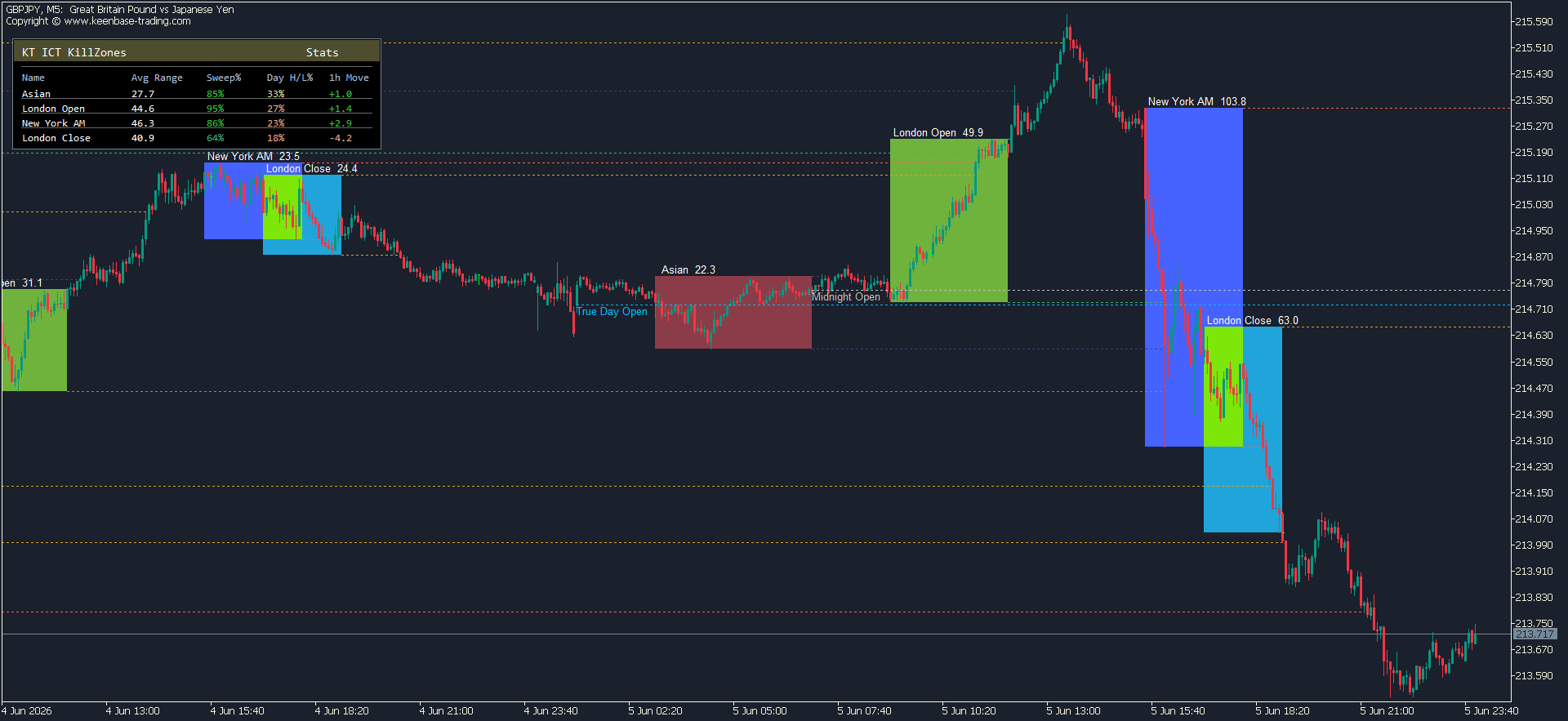
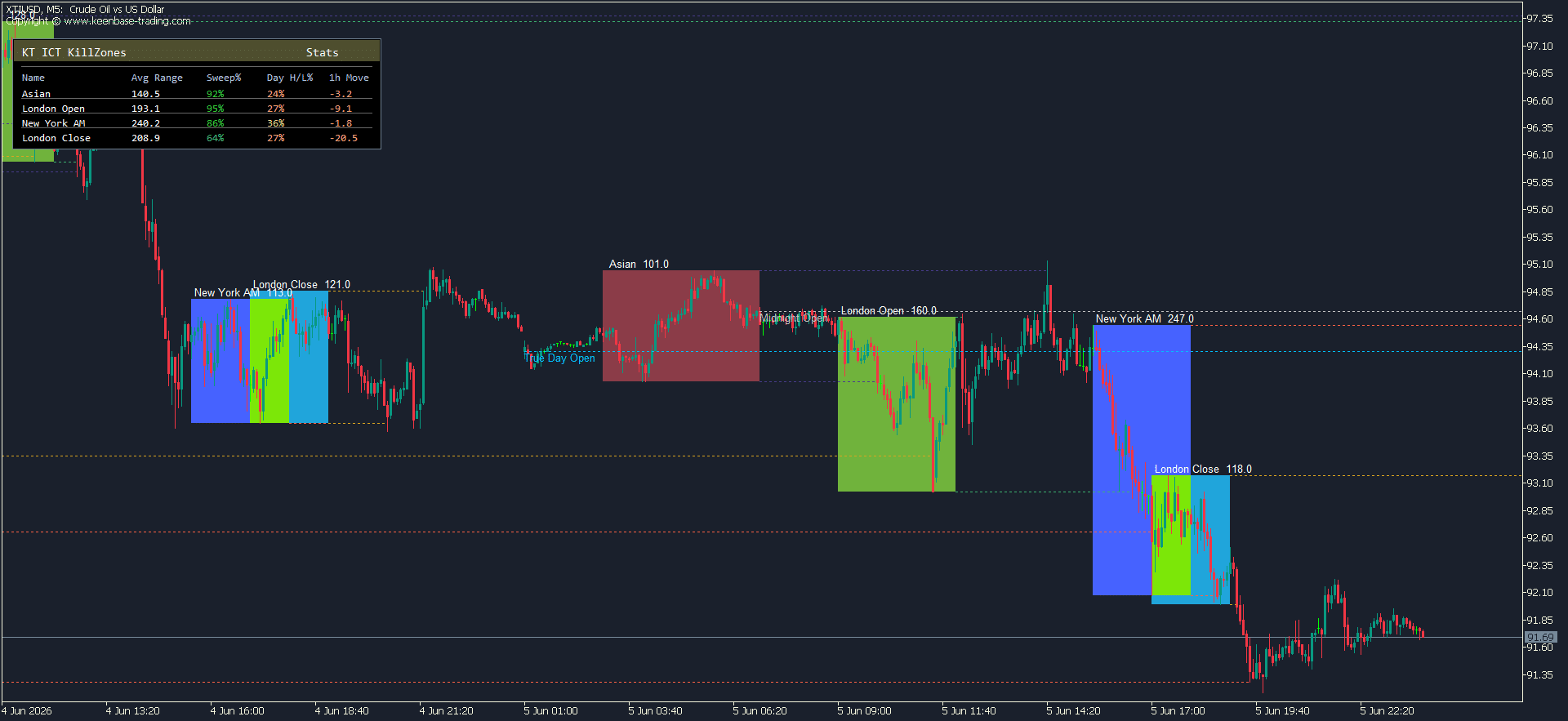
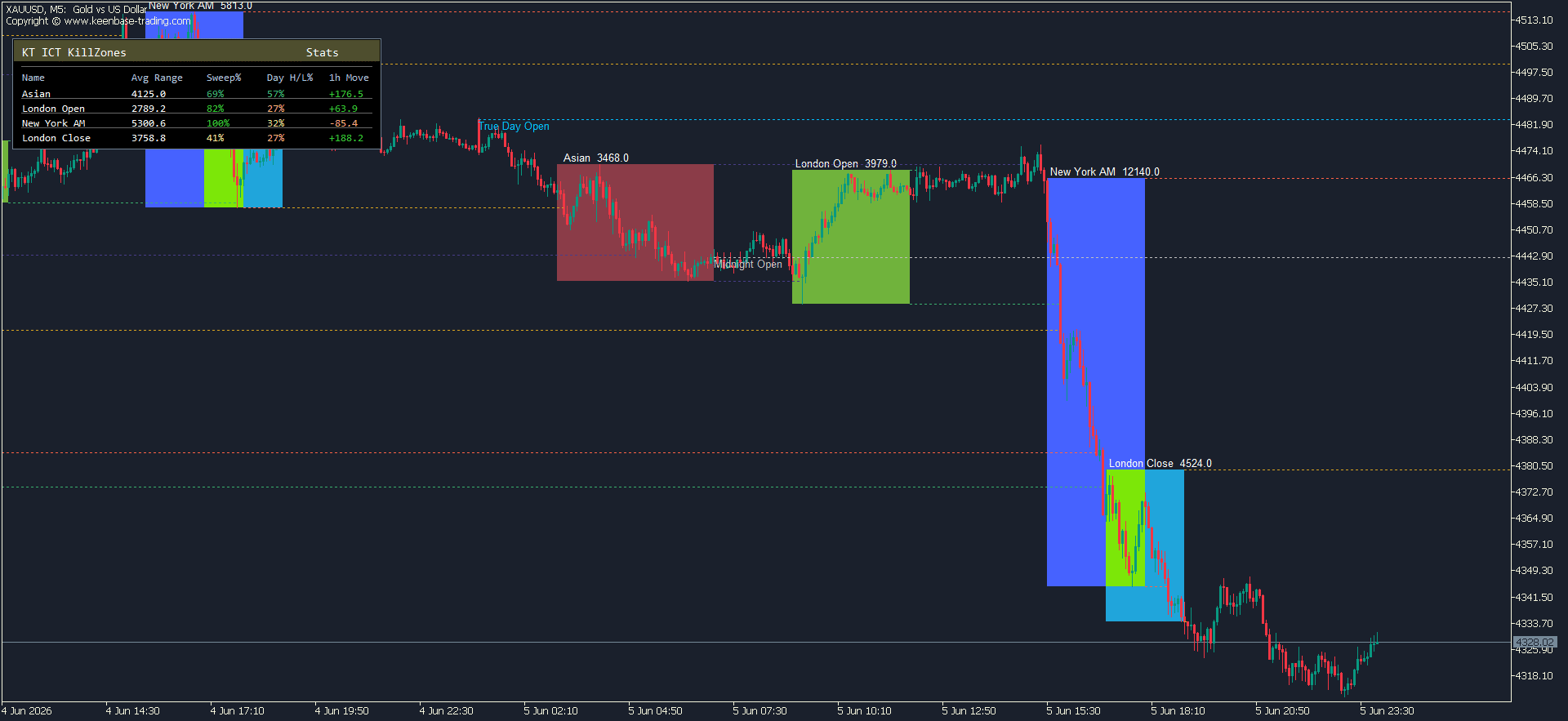
The four killzones, drawn automatically: The indicator marks the Asian, London Open, New York AM, and London Close sessions as colored boxes, and each box stretches to cover the actual high and low traded during that window.
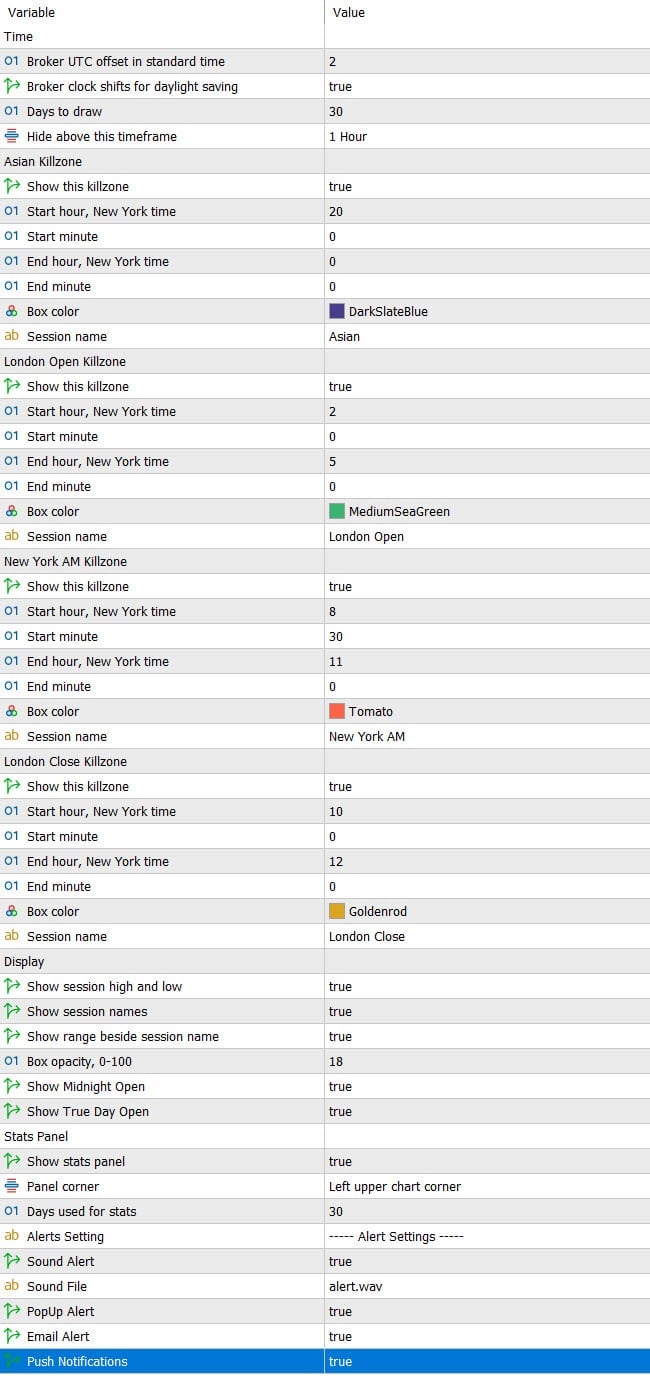
You can turn any session on or off, change its colors and opacity, and adjust the start and end times if your approach uses different windows.
The defaults are the standard New York session times most ICT traders work from: Asian 20:00 to 00:00, London Open 02:00 to 05:00, New York AM 08:30 to 11:00, and London Close 10:00 to 12:00.
Session highs and lows that track liquidity: Once a session finishes, you can have the indicator plot its high and low as dotted lines that run forward across the chart. They keep extending until price trades through them, then stop at the break.
It is a quick way to see when the high or low of a session has been taken, which is exactly the kind of liquidity grab a lot of ICT setups are built around.
Midnight Open and True Day Open: Two reference levels ICT traders watch closely. The indicator can plot the New York Midnight Open and the True Day Open at 18:00 New York time as labeled dotted lines, so you always have those prices on the chart without marking them yourself.
Session labels and range readout: Each box can show the session name, and you can have it display the range next to the label, too, in pips for forex or points for everything else. Rename the sessions if you like your own labels.
Up to 30 days of history: By default, the indicator draws the last 30 days of sessions, so you can scroll back and study how previous ranges, sweeps, and reactions played out. Set it to whatever number of days suits you.
Stays clean on higher timeframes: There is a "hide above timeframe" setting, set to H1 by default. Go above that, and the boxes disappear, so your higher-timeframe charts do not turn into a wall of overlapping rectangles. If you are too zoomed out, it tells you which timeframe to drop to.
The Stats Panel: See How Each Killzone Actually Behaves on Your Symbol
This is the part most session indicators leave out, and it is the reason this one is worth keeping on your chart.
Drawing the kill zones is useful, but it does not tell you whether a session is worth trading on the pair in front of you. The London Open might sweep the Asian range and set the tone for the day on EURUSD, while on some other symbols, it barely does anything. Instead of guessing, you can just look.
Switch on the stats panel, and it sits in the corner of your chart, showing four numbers for every session, worked out from your recent history:
Average Range is the typical size of the session, so you know at a glance whether a killzone tends to move or sit still on this symbol.
Sweep % is how often the session pushes past the previous session's liquidity. It compares each killzone against the range that matters before it: London Open against the Asian range, New York AM against London Open, London Close against New York AM, and the Asian session against the prior New York day.
This is the liquidity-grab idea ICT traders talk about, put into an actual number.
Day High/Low % tells you how often the high or low of the whole New York day ends up being made inside that session. A high reading means the session regularly sets the extreme for the day.
1h Move is the average move in the hour after a session closes, so you can see whether the action tends to continue once the window shuts.
The values are color-coded so the stronger and weaker readings stand out without you having to study the panel. You choose how many days it looks back over and which corner it sits in, and you can turn it off entirely if you would rather keep the chart bare.
Spend a few minutes with it on the symbols you trade, and you start to see which sessions are worth your attention and which ones are noise on that particular market.
Alerts
You do not need to sit watching the clock. The indicator can alert you the moment a killzone opens and again when it closes, so you can step away and still catch the windows you care about.
You get the usual options: a sound alert, a pop-up on your screen, an email, or a push notification to the MetaTrader app on your phone. Pick whichever fits how you trade, and choose your own sound file if you want a particular tone for these.
A couple of practical touches. Each alert fires once per open and once per close, so you are not getting hit with the same notification over and over. And if you have switched a session off, it stays quiet; you only hear about the killzones you actually use.
Setup: Getting the Session Times Right
There is one setting worth understanding before you start, and it is the same one that throws people off with every session indicator: the broker time offset.
Your killzones are based on New York time, but MetaTrader draws everything in your broker's server time, which is usually a few hours ahead. So the indicator needs to know the gap between the two.
You set your broker's offset from UTC once, tell it whether your broker shifts its clock for daylight saving, and from there it lines everything up to proper New York time and keeps it there, including across the US daylight saving changes in March and November.
If you are not sure what your broker's offset is, it is easy to check. Most brokers list their server time on their website, or you can compare the time on a chart against the actual time. Get it set correctly once, and you can forget about it.
The quickest way to confirm it is working: pull up a session you know well, EURUSD during London Open is a good one, and check that the box sits where you would expect it. If it looks like an hour or two off, your offset needs a small adjustment, not the indicator.
Inputs
Who This Indicator Is For
This one is built for traders who already think in terms of sessions and liquidity. If you follow ICT or smart money concepts, the killzones, session highs and lows, Midnight Open, and True Day Open are probably already part of how you read a chart, and this just puts them there for you automatically.
It works on whatever you trade. Forex pairs, indices, commodities, and other CFDs all show their session ranges the same way, and the stats panel adjusts to the symbol in front of you, so it is just as useful on US30 or gold as it is on EURUSD.
It tends to suit intraday traders most, the people who care about what London and New York are doing and want their levels marked before the session opens.
If you trade the London Open sweep, watch for the New York day high or low to form, or use the Midnight Open as a reference; this keeps all of that in front of you without the daily setup.
If you do not trade around sessions at all, this probably is not for you, and that is fine. It is a focused tool for a specific way of trading, not a do-everything indicator.
Common Questions
Does it work on both MT4 and MT5? Yes. There is a version for each, and they work the same way.
Is it really free? Yes, this one is a free download. No trial period, no locked features.
Why are my killzones in the wrong place? Almost always, the broker's time offset. Your sessions are drawn in New York time, but your platform runs on broker server time, so the indicator needs to know the difference. Set your broker's GMT offset correctly, and the boxes will fall into place. There is more on this in the setup section above.
Do I have to change the times for daylight saving? No. Once your broker offset is set, the indicator handles the US daylight saving changes on its own, so your New York session times stay accurate through March and November.
Can I use it on indices, gold, or other CFDs? Yes. It draws sessions on anything in MetaTrader, and the stats panel adapts to whatever symbol you have open. Ranges show in pips on forex and in points on other instruments.
Will it clutter my higher timeframe charts? No. It hides itself above H1 by default, and you can change that level. If you are zoomed out too far, it tells you which timeframe to drop to.
Does it give buy and sell signals? No, and that is on purpose. It is an analysis tool that maps sessions, levels, and historical tendencies so you can make your own read. It does not place trades or tell you when to enter.
Does it repaint or lag? The session boxes and highs and lows are based on prices that have already traded, so what you see for a completed session does not change after the fact.