
Non Repaint Arrow Indicator for MT4 and MT5: What It Means and How to Prove It
A non repaint arrow indicator draws each arrow only after its bar has closed, and never moves it, removes it or adds a new one to an older bar later. The useful question is not “does it repaint?” but when each arrow first became visible.
KT Alpha Hunter Arrows for MT4 and MT5 is built on that rule. Its code decides each arrow only at the close of a bar, and the arrow stays on the bar where the signal became known.
The test matters more than the label. “Non repaint” is printed on many arrow indicators, and it is a claim about code you usually cannot read.
When the arrow became visible is the real question
“Does it repaint?” is the question traders ask first about any arrow indicator. The follow-up they rarely ask is more useful: on which bar did the arrow appear, and when could a trader first see it?
A finished chart cannot answer that by looking. An arrow can sit still on an old bar today and still have been drawn there several bars after that bar closed, when the price beside it was already gone.
Most traders know to look for an arrow that flickers on the forming bar or moves after the close. The harder case is an arrow added later to a bar that closed earlier. That arrow never moves afterwards, so a finished chart hides it completely.
Why an arrow at every exact top and bottom is a warning sign
At the close of a bar, no calculation can know whether later bars will make it the swing high. By reasoning, an indicator whose arrow lands on the exact top of every swing is using those later bars, so its arrows were placed, or moved, afterwards.
ZigZag redraws its latest point by design, and a fractal is drawn on a bar only after two more bars have closed. Both are useful for drawing structure, but neither is a signal you could have taken at that bar.
So the more perfect the arrows look on history, the more they deserve a test.
How KT Alpha Hunter Arrows decides an arrow at the close of a bar
The MT5 and MT4 versions of KT Alpha Hunter Arrows follow the same order of events on every bar.
Closed bars only: the indicator stops at the last bar that has finished. The bar still forming is never checked for an arrow, so there is nothing on it to appear and disappear.
A level from earlier bars: price must close beyond a level measured from the bars before the signal bar. The signal bar is not part of its own level.
Strength judged on the finished candle: the close and the body of the signal bar are judged only once the bar has closed. A candle that looked strong in the middle of the bar and closed weak does not produce an arrow.
Confirmation, never backdating: when the breakout candle closes without enough strength, the indicator waits a short window of bars for a close that confirms it. If one comes, the arrow is drawn on that confirming bar, not back on the breakout bar.
If price closes back through the level, or the window runs out, the setup is dropped. Either way, an arrow always sits on the bar where the signal became known.
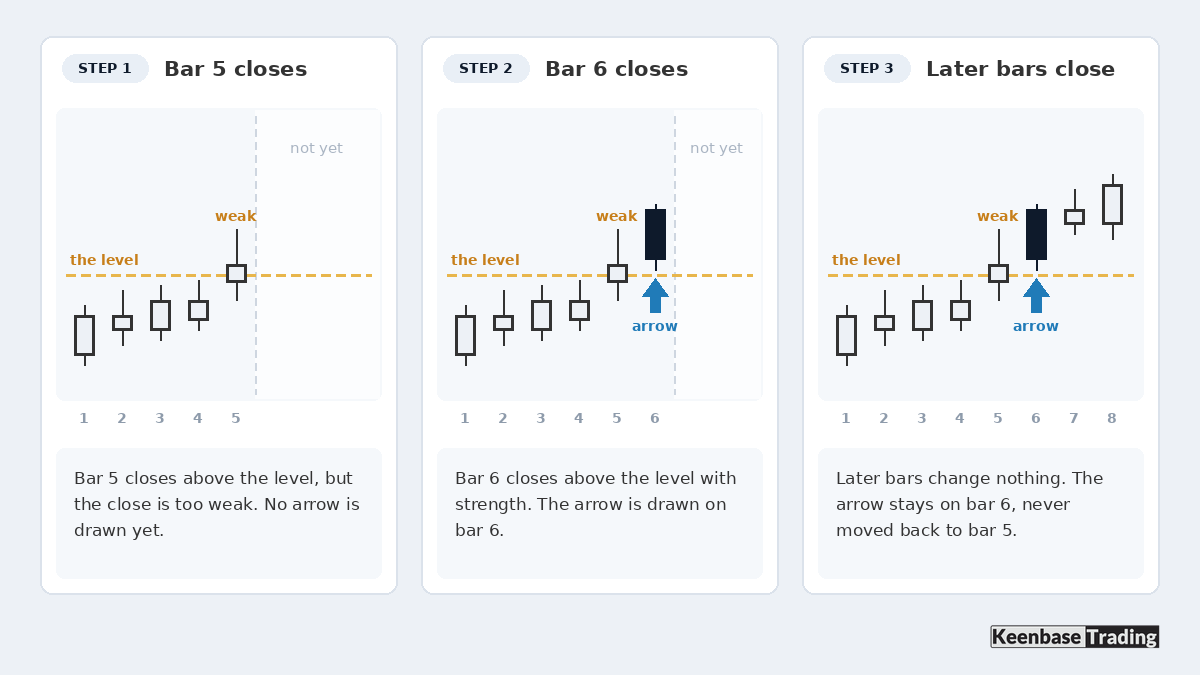
One alert, on the first tick after the close: the popup, push or email alert is sent only for the bar that has just closed. It is sent once for that bar.
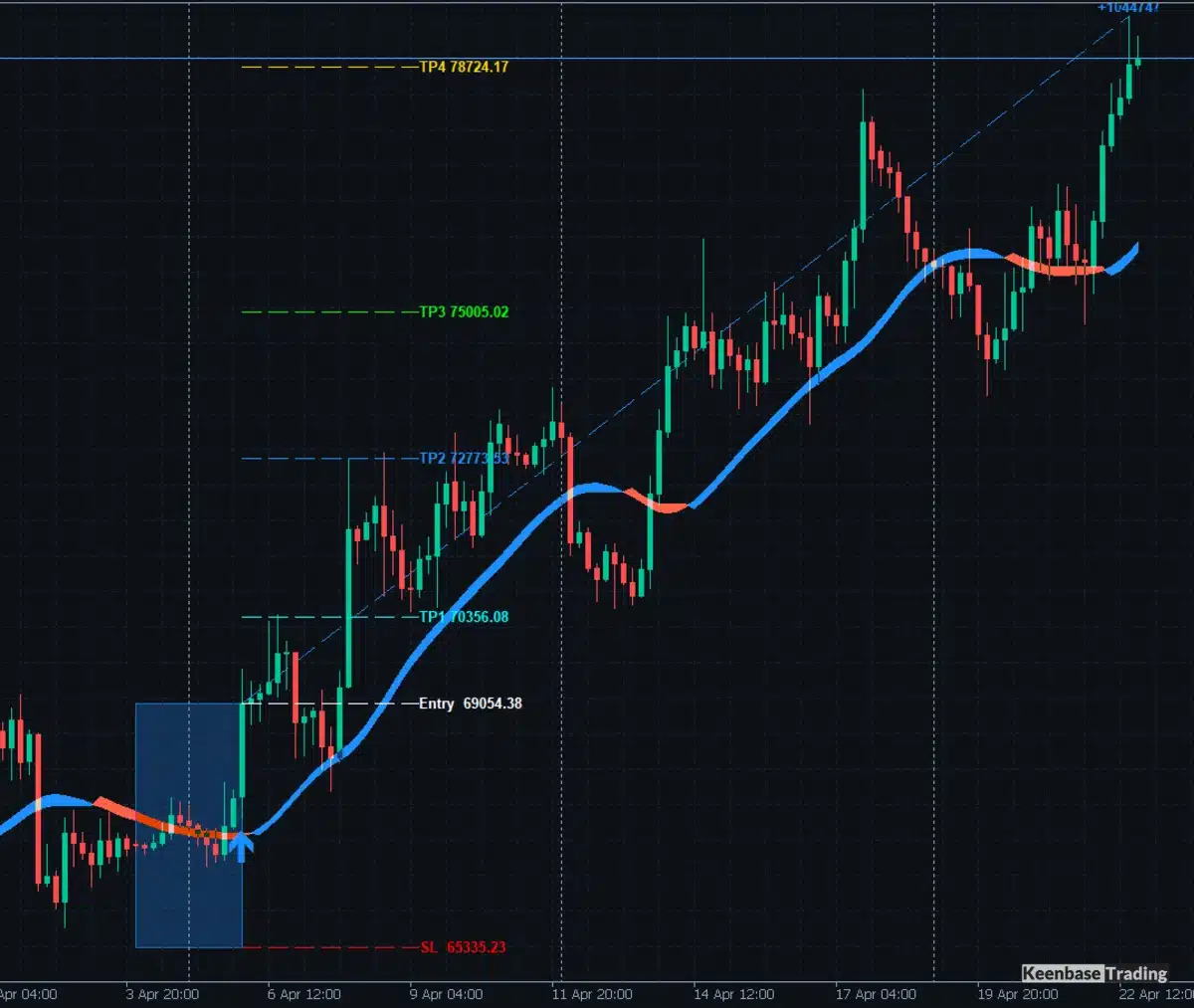
Each arrow arrives with its entry, stop loss and four take profit levels, TP1 to TP4, drawn at the same moment. The whole trade plan is fixed when the arrow is fixed.
How to check a non repaint claim yourself
Compare what the indicator showed live with what the chart shows later. Note the bar of every arrow as each bar closes. Then reload the chart, or restart the terminal, with the same settings.
Every arrow must still be on the same bar, and no new arrow may appear on an older bar.
For a full five-step version of that check on any MT5 arrow indicator, see how to test a buy sell indicator for MT5.
What can still change on the chart without repainting
Three things on a KT Alpha Hunter Arrows chart can change after you first look. None of them is an arrow moving.
The trend cloud on the bar still forming: it follows price until that bar closes, like any line drawn on a live bar. The arrows do not use the forming bar at all.
Your settings: changing an input, or pressing Auto Optimize to tune the settings for the chart, redraws the history with the new values. Arrows made with one set of settings and arrows made with another are two different histories, so test with one set and keep it.
The arrow’s distance above or below the candle: it is set once when the indicator loads, so arrows do not jump when you scroll. The bar the arrow belongs to is what matters.
Non repaint does not mean you can buy at the arrow’s price
A closed-bar arrow becomes visible on the first tick after the bar closes. The earliest price you can act on is that tick, not the close of the signal candle.
By reasoning, on a quiet market the difference is usually small, while after a news release or a weekend gap it can be a large part of the move. A backtest that fills every trade at the signal close flatters any closed-bar indicator for the same reason.
The setup steps for KT Alpha Hunter Arrows therefore say to check that price has not already passed TP1 before you enter.
A non repaint arrow is not a trading system
Traders who ask for a custom non repainting arrow indicator usually ask for more at the same time. They want the entry price, stop loss and take profit lines drawn with the arrow, and a clear “no trade” state. The arrow alone is not what they want.
Non repainting proves only that the signal record is honest. A trading system also needs a stop, an exit and a reason to skip a signal.
KT Alpha Hunter Arrows adds those parts. The stop sits beyond the nearest swing with breathing room, not at a fixed pip distance, and four targets are drawn with the arrow.
Its Edge Dashboard rates buy and sell setups separately for the chart you are on. Its verdict is one of four: trade both sides, buy signals only, sell signals only, or skip the chart.
The included Trade Manager EA never opens a trade by itself. After you enter by hand, it manages the trade with one of five plans you choose in advance.
Questions traders ask about non repaint indicators
What does non repaint indicator mean?
A non repaint indicator does not change what it has already shown for closed bars. For an arrow indicator, that means no arrow on the forming bar, no arrow that moves after the close, and no arrow added later to an older bar.
What is a repainting indicator?
A repainting indicator changes its past signals as new bars arrive. Some do it by design, like ZigZag. Others do it because they use the bar still forming, or because they draw a confirmed signal back on an older bar.
Repainting is not a setting that can be switched off. It is in how the signal is calculated.
What should the best non repaint arrow indicator for MT4 prove?
Not a screenshot of clean arrows on history. It should prove that an arrow seen live on a closed bar stays on the same bar. That means after later candles, after a chart reload, and after a fresh calculation with the same settings.
On MT4 you can check this on a demo chart: note the bar time of every arrow for a few days, restart the terminal, and compare. The MT4 and MT5 versions of KT Alpha Hunter Arrows use the same closed-bar logic.
Is there a best non repainting forex indicator for day trading?
No indicator is best for every symbol and session. On a day-trading timeframe, a closed-bar arrow means waiting for the M5 or M15 bar to close. So choose one that also shows where the stop loss goes, and which side of the market is worth trading on your chart.
KT Alpha Hunter Arrows runs on any timeframe from M1 to Daily, and its Edge Dashboard rates buy and sell signals separately for the chart you trade.
Will an EA built on a non repaint arrow indicator trade what the history shows?
Only if the arrows on the history are the arrows that were there live. An arrow added later to an older bar was not there when the EA had to decide, so a backtest of that history promises trades that could not have happened.
The same problem from the EA side is covered in converting an indicator to an EA.
Can a non repaint trend indicator still change?
A trend line drawn on the bar still forming moves until that bar closes, which is normal. What must not change is the value on bars that have already closed. Check it the same way: record the values at the close, reload the chart, compare.
Can you trust a non repaint arrow indicator MT4 free download?
A downloaded .ex4 file is compiled, so you cannot read its code, and “non repaint” is only a claim. Treat any such file as unproven until you have compared its live arrows with a reloaded chart.
KT Alpha Hunter Arrows for MT4 and MT5 draws each arrow on the bar where the signal became known, with the entry, stop loss and four take profit levels drawn at the same moment.
See KT Alpha Hunter Arrows for MT4 and MT5
About this article
Published by Keenbase Trading, which has been trading since 2018 and builds MT4 and MT5 indicators, Expert Advisors, free trading tools and custom MetaTrader development.