
Equity Stop Loss EA - The Best Tool to Maximize Capital Protection
An equity stop loss EA is a program that watches your whole account equity, meaning balance plus the floating profit and loss of every open position, and acts when that number reaches a level you set.
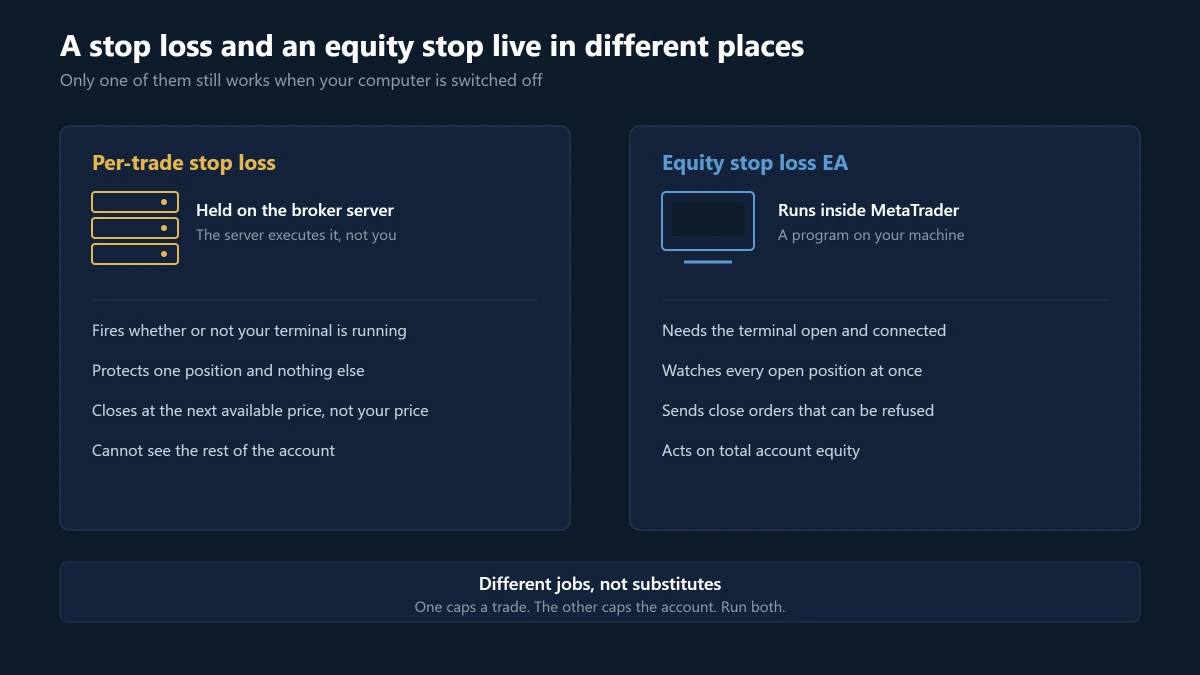
The distinction that matters most: it is not a stop loss order. A stop loss attached to a position lives on the broker’s server, and the server executes it whether or not your computer is switched on. An equity stop lives inside MetaTrader.
If the terminal is closed, there is no equity stop. That one fact decides where you should run it, where you should set the level, and what you should reasonably expect it to save you from.
What an equity stop protects that per-trade stops cannot
A stop loss caps the loss on one position. It says nothing about what happens when several positions lose at the same time, which is the situation that actually empties accounts.
Correlation is the usual culprit: six positions risking 1% each are not a 6% risk if they are the same trade wearing different symbols. Long EURUSD, long GBPUSD, short USDCHF and long gold is largely one bet on a weak dollar, and one dollar move takes all four stops together.
Several systems sharing one account: each EA can be operating perfectly inside its own rules while their combined floating loss pushes the account past anything you agreed to. No individual strategy is misbehaving. The portfolio is.
Gaps skip the level entirely: a stop loss is an instruction to close at the next available price once the level trades, not a promise of that price. Over a weekend or into a scheduled release, the next available price can sit far beyond it. Market hours decide how often you are exposed to that.
Automation removes the human check: an EA restarted with the wrong lot size, or one that averages into a losing position, will keep opening trades that each respect their own stop while the account bleeds. The account-level limit is the only thing watching the total.
When the level is reached, a well-built equity protector does four things: it closes open positions, cancels pending orders so no new exposure appears, optionally stops other EAs from reopening, and tells you it happened.
In practice that looks concrete. On a $10,000 account you might set the account floor at $9,000 and a profit target at $11,500. Below $9,000 everything closes. Above $11,500 the winning run is banked instead of being handed back.
The level you type in is an action threshold, not an exit price
This is the part the feature lists leave out, and it is the difference between understanding the tool and being surprised by it.
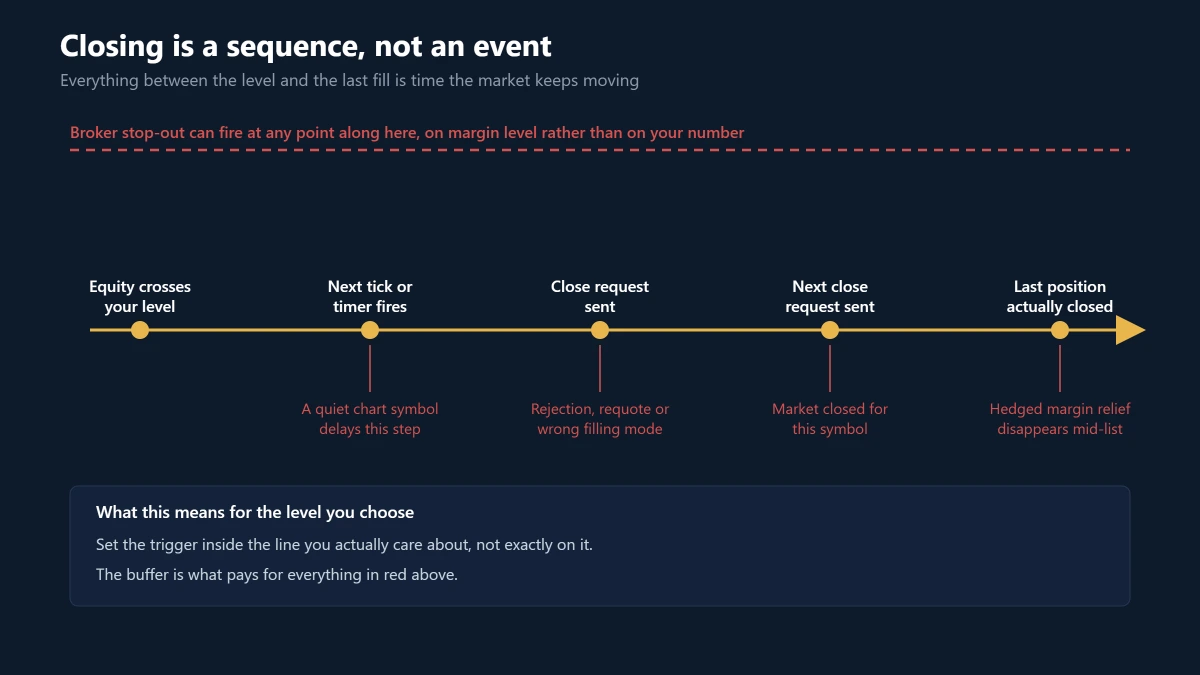
The number tells the EA when to start working. It cannot promise that every position leaves at that equity value, because between the trigger and the last fill sits a sequence of things that each take time. Four of them are documented platform behaviour rather than flaws in any particular EA.
It only wakes up when a tick arrives
An Expert Advisor’s main event is OnTick, and MetaQuotes is explicit in its client terminal events that the NewTick event fires only when new quotes arrive for the chart the EA is attached to.
Two things follow. An EA sitting on a quiet symbol checks your equity only as often as that quiet symbol ticks, even though your exposure is somewhere else entirely.
And the same page states that quotes arriving while OnTick is still running are ignored rather than queued, so the EA is deaf during its own work.
What a well-built one does instead: run the equity check on a timer, using EventSetTimer and OnTimer, so it fires on a clock rather than on one symbol’s quote flow. It is a fair question to ask of any equity protection EA before you buy it.
AutoTrading can be off while the EA looks alive
The same documentation notes that disabling automated trading blocks trade requests only. The Expert Advisor keeps running.
That produces the worst kind of failure: a dashboard that updates, an EA that correctly detects the breach, and nothing closing. Nothing on screen looks broken. Check the AutoTrading button, not the EA’s own status line.
Closing is a sequence, not an event
The EA does not close the account. It sends one close request per position, each a round trip to the server, and price keeps moving through all of them.
Requests can be rejected or requoted. Symbols use different order filling modes and a mismatch fails the request outright. A symbol whose market is closed cannot be closed at all, so an index or crypto position can sit open while the forex ones go.
This is why retry logic and a record of every attempt matter more than the trigger. The trigger is the easy part.
The broker’s stop-out can fire first
Your broker already has an equity rule of its own. MetaTrader exposes it as ACCOUNT_MARGIN_SO_CALL and ACCOUNT_MARGIN_SO_SO, and when equity is no longer enough to maintain open positions the server force-closes them itself.
That rule is measured as a margin level percentage rather than in money, so it does not sit where you put your line. If your equity stop is below the point where margin level reaches stop-out, the broker gets there first and closes in its own order.
A sharper version on hedging accounts: margin there is calculated with hedged margin relief. Closing one leg of a hedge removes that relief, so the requirement on what remains can rise at the exact moment the EA is working through its close list.
Ask what the level is measured from before you ask what it should be
Most people begin configuration by asking what percentage to use. That is the second question. The first is what the percentage is measured from.
Take a daily rule with positions already open at the reset moment. A balance anchor and an equity anchor start from different numbers, because floating profit and loss moves equity while balance sits still. Same percentage, different rule.
The gap widens on a maximum drawdown rule. Ten percent from the initial balance and ten percent from the highest equity ever reached are not variations of one setting. They are separate risk policies that happen to share a number.
Choosing the anchor first is what stops a mathematically correct setting from enforcing a policy you never intended.
Choosing the level without guessing
There is no percentage that is correct for every account, and quoting one would be inventing a number. A method you can apply to your own data is more useful.
- Decide what you are limiting: today’s loss, total account drawdown, or profit given back after a good run. These are three different rules and a level that suits one rarely suits the others.
- Fix the reference: name the exact balance or equity value the loss is measured from, including which moment it is sampled.
- State the limit in currency first: converting to a percentage afterwards keeps the actual consequence visible while you decide.
- Check it against your own history: find the largest floating drawdown your open positions have reached on a day that ended fine. Your stop belongs beyond that number.
- Leave execution distance: everything in the previous section costs time and price, so the trigger should sit inside the line you actually care about rather than exactly on it.
If normal market volatility keeps taking the account close to the intended stop, one of two things is true. Either the portfolio risk is too large for that limit, or the level does not match the strategy.
Do not resolve that by moving the stop further away. That converts a protection problem into a larger loss.
If you do not yet have the drawdown history, you do not have the input, and any level is a guess. Gather a few months on demo or on a small account first.
Prop firm accounts need formula matching, not percentage matching
Setting your EA to 5% because the firm says 5% is not the same as matching the rule. The calculation has to match as well.
Read the firm’s rulebook for six things: the daily starting value, whether the test is on balance or equity, whether floating profit moves the reference, whether the maximum drawdown trails, when the daily calculation resets, and which clock defines that reset.
Then choose the anchor and reset that represent that rule as closely as the EA allows. If the firm’s rule cannot be represented accurately, do not assume a similar-looking percentage makes the two calculations equivalent.
How KT Equity Protector EA implements this
KT Equity Protector EA is the Keenbase implementation. It does not open trades or decide direction. It attaches to one chart, watches the whole account, and acts when a rule you set is crossed.
Setup is seven plain-English questions on the chart rather than a page of raw inputs. The first asks whether this is a Personal Account or a Prop Firm Account, and the remaining questions, dashboard and defaults reshape around that answer.
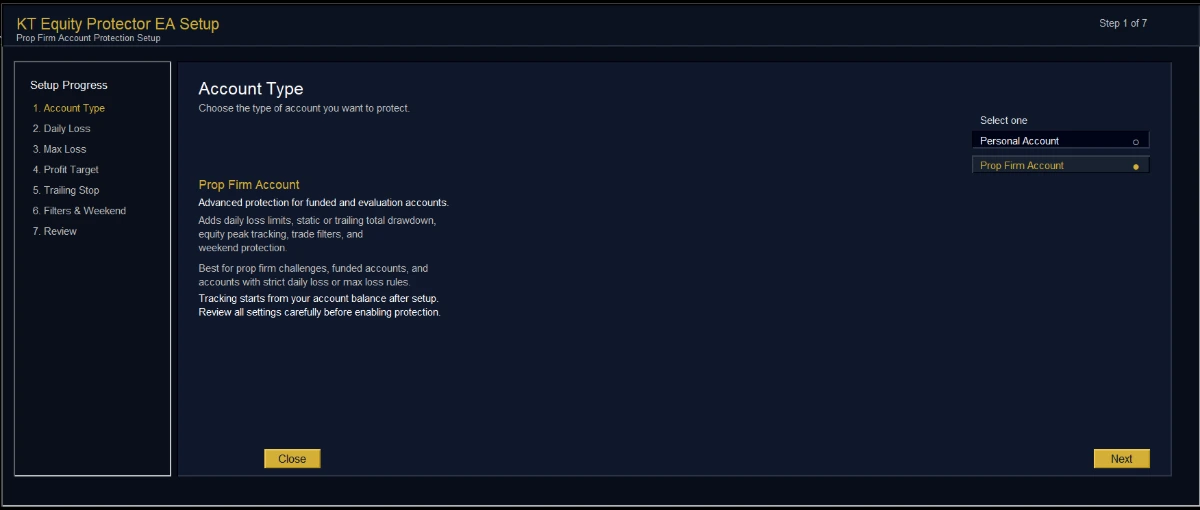
Percentages convert to currency live while you type, so the monetary consequence is visible at the moment you choose it, and drafts save every two seconds so a crash mid-setup does not cost you the configuration.
Five rules run independently. Configure the ones you need and ignore the rest. When several fire at once the strongest configured action wins.
- Daily loss limit: anchored to start-of-day balance, start-of-day equity, or the previous close of either, as a percentage or a fixed amount, with a configurable reset time in broker time. It tracks the day’s peak consumed percentage and keeps it sticky rather than letting a recovery erase it.
- Max loss and drawdown: an account-wide floor anchored to the initial balance, a custom starting balance, or a trailing peak of balance or equity, re-anchorable later from the dashboard.
- Profit target: closes everything once a gain is reached, calculated independently of the trailing stop so you can run either or both.
- Equity trailing stop: arms only after a profit threshold you set, then fires if equity gives back more than you allow from its peak.
- Weekend close: flattens everything at a set Friday time in broker time.
Both loss rules take an optional safety buffer, which is the execution distance argued for above. Tripping at 4.8% when the real line is 5% is what turns a threshold into a rule that fires before the one that matters.
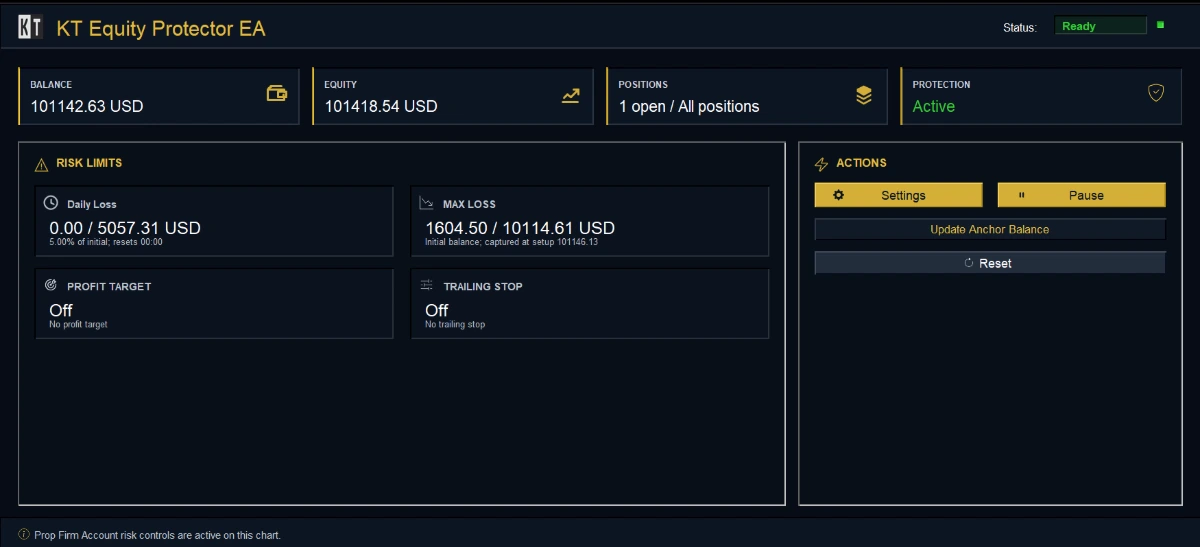
When a rule fires you choose the action: alert only, close losers, close winners, close all, or close all and remove every other Expert Advisor from the terminal so nothing reopens. Pending orders are cancelled, rejected closes are retried, and the correct filling mode is selected per symbol.
Afterwards the account holds a reset-required state until you physically click Reset. A recovery in equity does not quietly clear a protection event that already happened, which is what you want when you come back to the terminal hours later.
One configuration decision deserves care: the symbol, magic number and comment filters narrow what the EA manages. That is right when you are ring-fencing one strategy inside a larger account, and wrong when you wanted a whole-account emergency stop, because the excluded positions stay open.
Configuration, state and logs are keyed to the account login, so one terminal can hold several accounts without anchors and peaks from one leaking into another.
Every trigger, close attempt, retry and rejection is written to a dated CSV in the MetaTrader files folder with the balance, equity, floating profit and loss and position count at that moment, kept for 30 days by default. That file is what tells you afterwards whether the EA was slow or the market was.
What it does not do: it cannot act while MetaTrader is closed, which is the argument for a VPS. State persistence across a crash or a disconnect is not the same as monitoring, because a saved anchor does nothing while the platform is down.
It also does not replace per-trade stops, and it does not know your prop firm’s rulebook. The anchor, the reset time and the buffer are yours to set from that document.
How to test it before you trust it
The Strategy Tester will load an equity protection EA and produce a report, but the report means nothing, because the EA opens no trades and the tester exists to evaluate trading logic. Testing has to happen on a demo account with real tick flow.
Use deliberately small thresholds on a demo account so the events are easy to reach, then work through five checks:
- Force a breach: open a position far larger than you would normally trade and let it hit the level. Note the equity when it triggered and the equity when the last position actually closed. The gap between them is your real slippage across the whole account.
- Restart the terminal: kill MetaTrader with positions open and the EA armed, then reopen it and confirm the anchor, peak and reset state came back rather than starting fresh.
- Use a mixed basket: hold positions on symbols with different trading hours and trigger the stop while one of those markets is closed, so you learn what happens to the position that cannot be closed.
- Turn AutoTrading off: arm the EA, disable AutoTrading and force a breach. You should see it notice and fail to act. Five minutes now saves an unpleasant discovery later.
- Read the log afterwards: open the CSV and check that the recorded sequence matches what you watched happen on the chart.
The point is not to measure profitability. It is to prove that the rule you think you configured is the rule the software actually enforces.
The one thing to take away
An equity stop loss EA is not a safety net that exists whether or not you are watching. It is a program, running on a machine, reacting to ticks and sending orders that can be refused.
Treated that way it is the most useful layer of protection most retail accounts are missing. Treated as a guarantee, it becomes the reason someone asks why the account lost more than the number they typed in.
Set the level from your own drawdown history, give it a buffer, run it where the terminal never sleeps, and test it until you have watched it fire.
Protect your whole account with KT Equity Protector EA
About this article
Published by Keenbase Trading. We have been trading since 2018 and we build MetaTrader 4 and MetaTrader 5 indicators, Expert Advisors, free tools and custom development, including the account protection EA discussed above.