
Static vs Trailing Drawdown: How Each Prop Firm Model Works
A static drawdown fixes your loss floor at the starting balance and leaves it there. A trailing drawdown attaches the floor to a high water mark and drags it upward every time the account makes a new peak. It never moves back down.
That single difference decides how much room you actually have after a good week. Under a static 10% rule on a $100,000 account the floor sits at $90,000 permanently, so a run to $104,500 leaves you $14,500 of room.
Under a trailing 10% rule the same run pulls the floor up behind you, and the room barely changes.
The practical consequence: a static account gets safer as it grows and a trailing account does not. On a trailing model your risk budget is capped for the life of the account, so position sizing that scales with equity quietly moves you closer to the floor with every winning trade.
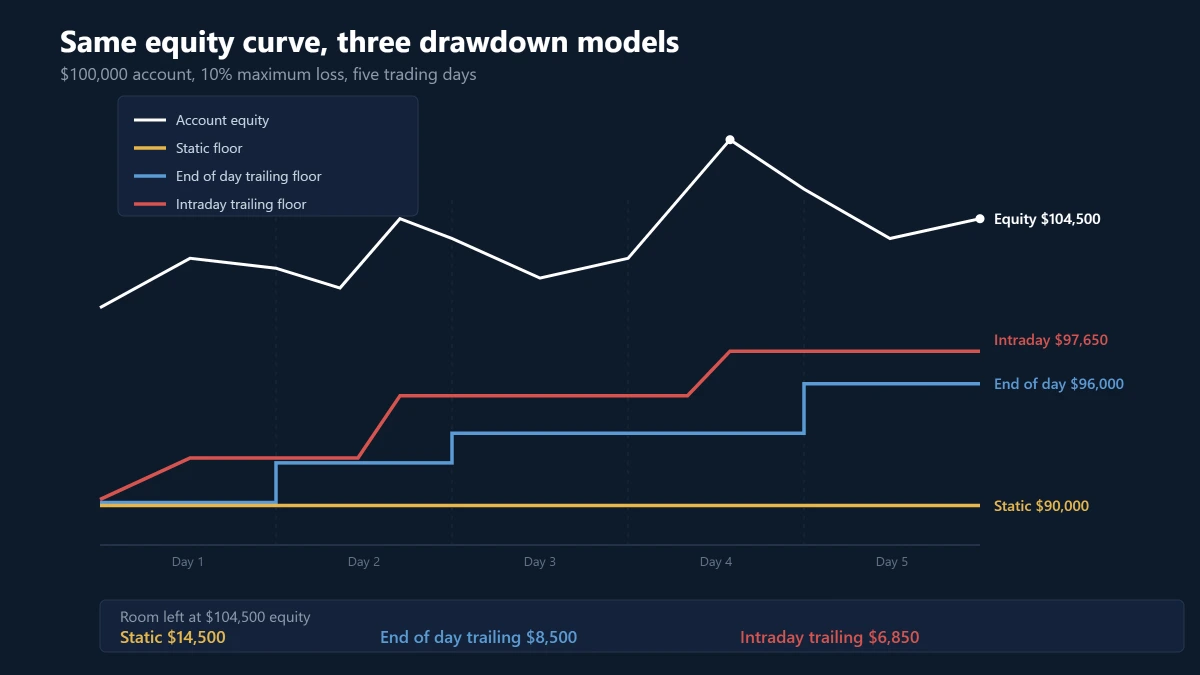
Trailing is three different rules sharing one name
Most comparisons stop at static versus trailing. The bigger distinction sits inside the word trailing, because firms use it for two mechanisms that behave nothing alike.
Intraday trailing on peak equity: the floor follows the highest value the account touches at any moment, including unrealized profit on an open position. Apex Trader Funding states that the threshold adjusts immediately when an open trade sets a new high, with no closing trade required.
FundingPips Zero trails the highest ever recorded equity in the same way.
End of day trailing on closing balance: the floor is recalculated once a day from the account balance at a fixed cut-off, and intraday spikes are ignored. Topstep’s Maximum Loss Limit works this way.
So does the Maximum Loss rule on FTMO’s 1-Step Challenge, which recalculates at 00:00 CE(S)T from the highest midnight balance recorded on any preceding day.
Static: the floor is set once from the initial capital and never recalculated. FTMO’s 2-Step Challenge uses this, as does FundingPips 2 Step Pro, whose help centre states plainly that the 6% floor never moves.
The5ers describe the same structure from the other side: the stop-out level stays put while the permitted drawdown amount grows with profit.
Notice that FTMO and FundingPips each ship both models. The firm’s name tells you nothing. The product you bought inside that firm decides which rule you are living under.
The floor is raised by balance, the breach is tested on equity
Read the rulebooks carefully and the same asymmetry appears in almost every model above. The floor is raised using balance, measured at a specific moment. The breach is tested against equity, continuously.
Topstep’s documentation makes the split explicit: the Maximum Loss Limit updates at the end of each trading day, but it is monitored in real time and both realized and unrealized profit and loss count toward it.
FTMO recalculates its limit from the midnight balance while stating that account equity cannot drop below it.
The measurement that helps you is taken conservatively, once a day, on closed results. The measurement that ends your account is taken aggressively, on every tick, including floating losses.
A trade that goes 60 pips against you at 11:00 and recovers by the close never earned you a higher floor, but it could still have ended the account. Both Topstep and FundingPips confirm that a limit touched briefly and then recovered is still a breach.
Failing while in profit, and why only one model allows it
Under intraday trailing, unrealized profit you never banked permanently reduces your remaining room. Apex publishes the arithmetic for a $50,000 evaluation with a $2,000 intraday drawdown.
The floor starts at $48,000. Unrealized profit lifts the balance to $50,900, which sets a new peak and moves the floor to $48,900 immediately. The balance then falls back to $50,200 and the floor stays at $48,900.
Close the trade at $50,300 and the peak remains $50,900. You are now $300 up with $1,400 of room instead of the $2,000 you started with. You paid $600 of drawdown capacity for profit you did not keep.
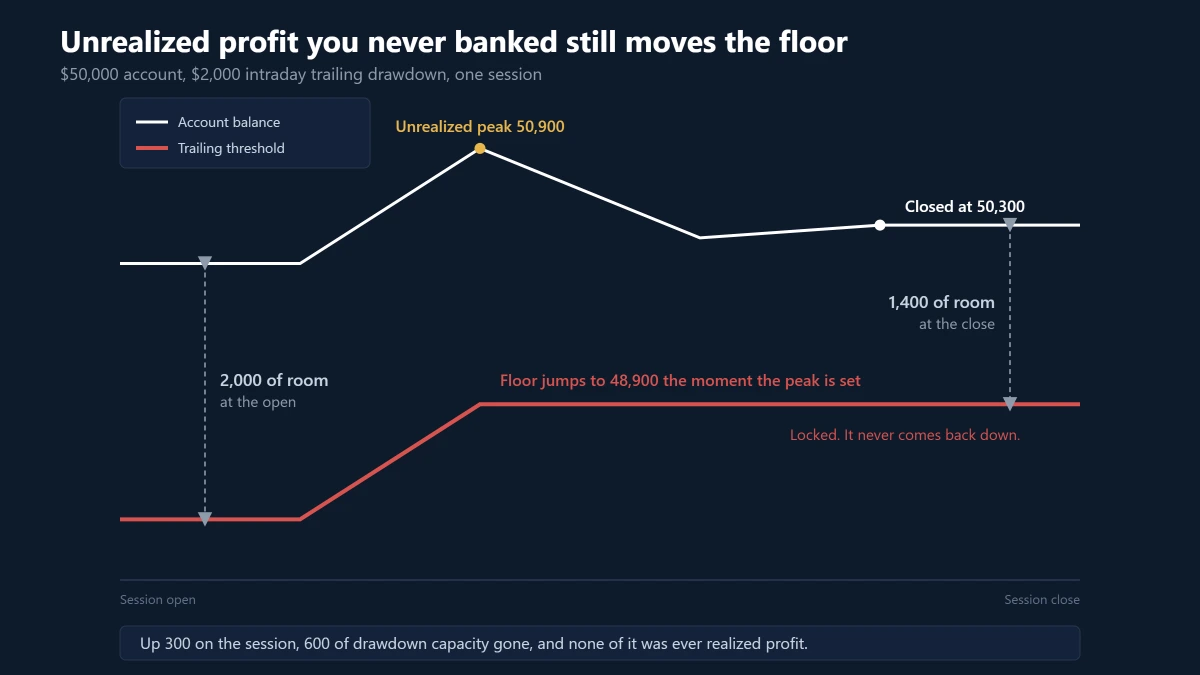
Under end of day trailing or a static rule that same trade costs you nothing. The floor only responds to what is on the books at the cut-off.
Who this bites hardest: strategies that let large floating profit build and then give part of it back before exiting. Trend and swing entries that trail a wide stop, and mean reversion exits that deliberately surrender some of an open gain, both interact badly with a real-time equity trail.
A strategy that closes quickly is affected far less, though its daily loss limit is usually the tighter constraint anyway.
Where the trailing stops matters more than the percentage
Trailing rules usually stop trailing at some point, and the stop condition varies far more between firms than the headline number does.
- Topstep: the Maximum Loss Limit rises with the end of day balance until it reaches the starting balance, then locks permanently. On a $50,000 Trading Combine it starts at $48,000, so roughly $2,000 of closed profit converts the account into a static one.
- FundingPips Zero: the 5% floor trails peak equity until the account is 5% up, then locks permanently at the starting account size.
- Apex Performance Accounts: the threshold stops rising once it reaches the starting balance plus $100, which on a $50,000 account is $50,100.
- Apex Tradovate evaluations: Apex states the intraday drawdown trails indefinitely with the peak balance and does not stop at a fixed level.
- FTMO 1-Step: the limit can only increase, and it resets fully when a reward is withdrawn and a new account is issued.
The same phrase therefore covers a rule that becomes static after a modest gain and a rule that follows you forever. Before comparing two firms on percentage, find the sentence that says when the trailing stops.
Your daily loss rule has its own anchor
Maximum drawdown and daily loss are graded separately, and knowing that the max loss rule is static tells you nothing about the daily one.
FTMO recalculates the daily limit each day at 00:00 CE(S)T from that day’s opening balance. FundingPips uses the higher of the opening balance or the opening equity, which is a materially different number if you were carrying a floating profit at the rollover.
Check four things on the daily rule separately: the anchor, the reset time and its timezone, whether floating profit and loss counts, and what happens to a position held across the boundary.
A trade that was comfortably inside the limit at 23:59 can start the new day with a different allowance.
Size from the distance to the floor, not from the account balance
This is where the two models produce genuinely different behaviour, and where most articles stop at description.
The number that matters is not the account size. It is the headroom, meaning the current monitored account value minus the active floor.
risk per trade = k × headroom (not k × equity)
Take a $100,000 account sitting at $101,000 equity. With a static $95,000 floor the headroom is $6,000. With a trailing floor that has already climbed to $99,000 the headroom is $2,000. Both accounts display $101,000.
Why fixed fractional sizing misleads on a trailing account: risking 1% of a nominal $100,000 sounds modest, but if only $2,000 sits above the active floor then a $1,000 planned loss consumes half the account’s remaining survival room.
Under a static rule, headroom and equity rise together, so sizing off equity stays roughly consistent with the constraint. Under a trailing rule, headroom is bounded above by the maximum loss amount no matter how large the account grows.
A more defensible approach on trailing accounts: risk a fixed percentage of headroom rather than of equity. That keeps a constant number of losing trades between you and a breach, which is what the rule actually measures.
This follows from the arithmetic of the two rules rather than from a test, so check it against your own trade record before adopting it.
Payouts move the floor, and every firm moves it differently
This is the most common reason a trader’s own tracker disagrees with the firm’s dashboard.
The5ers state that a payout reduces the account balance and therefore reduces the maximum drawdown allowance, because the floor stays where it is. FTMO resets the Maximum Loss Limit entirely when a reward is withdrawn and a new account is issued.
Topstep sets the Maximum Loss Limit to zero on an Express Funded Account after the first payout, making the remaining balance the effective floor. FundingPips Zero does the opposite and states that its trailing limit never resets after a reward.
The practical rule: after any withdrawal, re-derive the floor from the rulebook instead of assuming your tracker followed the change. A high water mark stored by software has no idea a payout happened.
Why MetaTrader will not show you this number
MetaTrader reports the current state of the account and nothing else. The MQL5 account properties lists ACCOUNT_BALANCE, ACCOUNT_EQUITY, ACCOUNT_PROFIT and the margin figures.
There is no property for a peak balance, a high water mark, or a drawdown floor. The number simply does not exist on the terminal. It has to be computed and stored by something running there, and four implementation choices change the answer:
- Balance peak or equity peak: the two differ by floating profit and loss. Track the wrong one and your floor is too low on an intraday account and too high on an end of day account.
- Update trigger: every tick, or once at a rollover. If it is a rollover, which clock? FTMO uses 00:00 CE(S)T, FundingPips uses 00:00 platform time at UTC+3, and your broker’s server time is usually neither.
- Persistence: terminal global variables are deleted automatically four weeks after their last access, so a peak parked there can vanish on an account that sits idle.
- Deposits and withdrawals: unless they are excluded, a deposit lifts the recorded peak and permanently tightens a floor the firm never moved.
Two EAs implementing trailing drawdown from the same rulebook can therefore report different floors, and the disagreement usually traces back to one of those four choices rather than to a bug.
Mapping a firm’s rule onto an anchor you can actually set
Once you know which model you have, protecting the account becomes a configuration problem. KT Equity Protector EA exists for this specific job. It does not trade. It watches account-level equity from a single chart and acts when a line you defined is crossed.
Its Max Loss rule offers four anchors, and they map onto the rule families directly:
- Initial balance: for a static rule such as FTMO’s 2-Step Maximum Loss, FundingPips 2 Step Pro, or The5ers stop-out level.
- Track highest balance: for end of day trailing rules anchored to closing balance, such as Topstep’s Maximum Loss Limit or FTMO’s 1-Step Maximum Loss.
- Track highest equity: for intraday trailing rules where unrealized profit sets the peak, such as Apex or FundingPips Zero.
- Custom starting balance: for an account that did not begin at a round figure, or one that has been re-anchored after a payout.
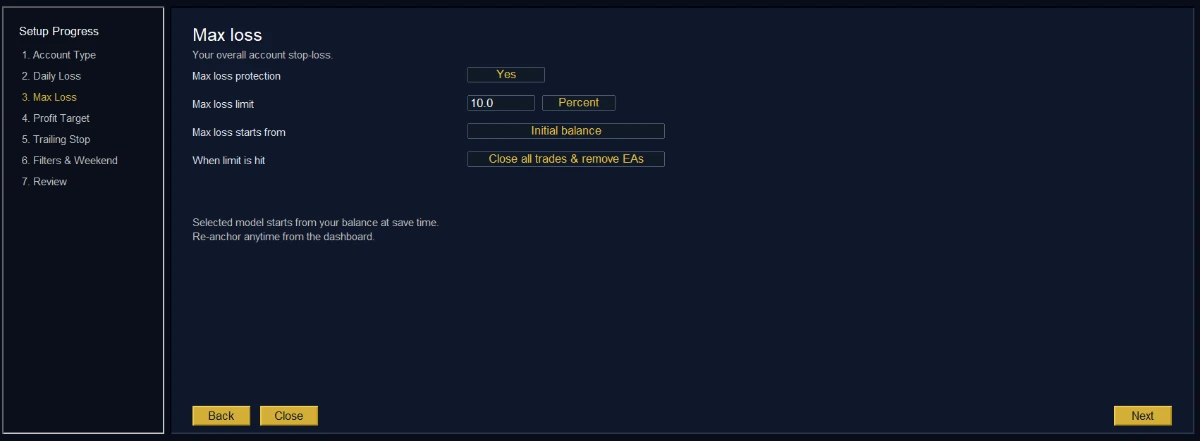
The peak tracking is sticky and persists across restarts and broker disconnects, which matters because a floor that resets when your VPS reboots is worse than no floor at all. The dashboard carries an Update Anchor Balance control for the payout case described above.
The safety buffer is the part that does the real work. Setting the EA to act at 4.8% when the firm’s line is 5% is what turns an account-level stop into a rule that fires before the firm’s does.
That margin matters because closing positions is an execution process rather than an instant.
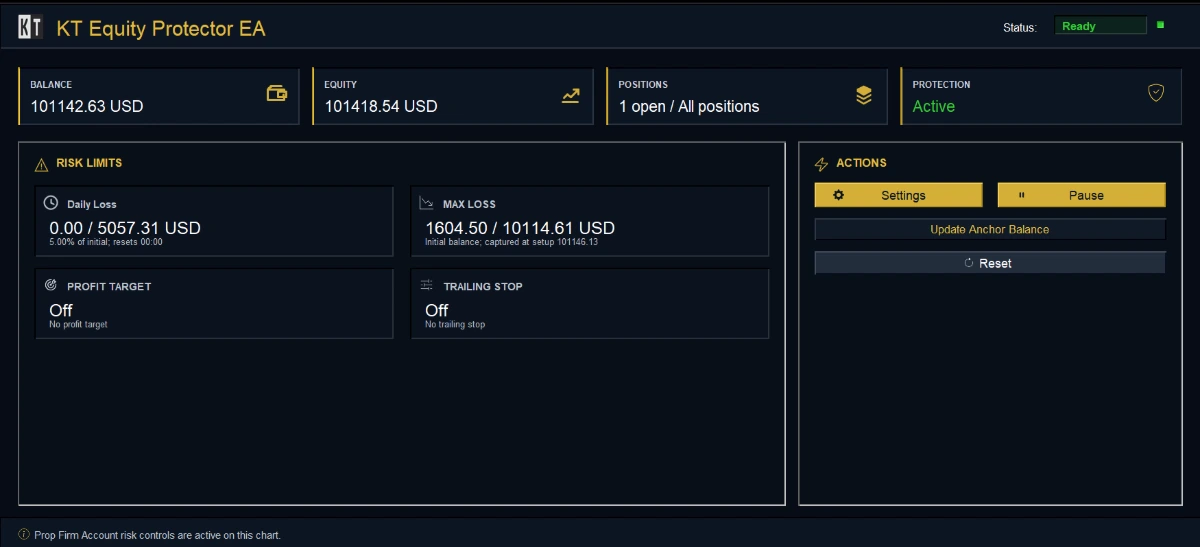
Two things to get right when you configure it: the daily loss rule has its own anchor list, including start-of-day balance, start-of-day equity and previous close, so set it from the firm’s daily rule rather than copying the max loss setting.
And if you use the symbol, magic number or comment filters, remember the firm grades the whole account, so a narrowed scope leaves the remaining positions outside the EA’s reach.
What it does not do: it does not know your firm’s rulebook, it will not detect a payout on its own, and it cannot act while the terminal is closed, which is why a VPS matters more on a trailing account than a static one.
Every trigger and close attempt is written to a timestamped CSV, which is the only thing that helps if you later need to show a firm what happened.
How to find out which model you actually have
Read the rulebook first. Six lines decide everything, and if the rulebook does not answer one of them, ask support before you trade rather than guessing.
- The anchor: initial capital, highest closing balance, or highest touched value including unrealized profit.
- The update moment: continuously, or at a stated time, and in which timezone.
- The value tested: balance, equity, or both.
- The stop condition: whether trailing halts at the starting balance, at some level above it, or never.
- What counts: whether commissions, swaps and floating profit and loss are included.
- Payout behaviour: whether the floor resets, holds, or moves to the post-withdrawal balance.
Then verify it on the account rather than trusting the marketing page. Open a small position on a quiet symbol, let it move a modest distance into unrealized profit, and close it flat. Note the drawdown figure on the firm’s dashboard before and after.
If the floor moved on the unrealized spike, you have intraday trailing. If it did not, check again after the next daily rollover: if it moved then, you have end of day trailing. If it never moves, the rule is static.
Two minutes of that test tells you more than any comparison table, because it measures the account you were actually issued rather than the product tier the website advertises.
Once you know the model, the EA gives you the matching anchor, a buffer that fires before the firm’s line, and a CSV record of what it did. Set it before the session starts, not after the number gets close.
Set your drawdown anchor with KT Equity Protector EA
About this article
Published by Keenbase Trading. We have been trading since 2018 and we build MetaTrader 4 and MetaTrader 5 indicators, Expert Advisors, free tools and custom development, including the account protection EA discussed above.
Prop firm rules change often. Every figure here was read from the firm’s own rulebook, but check the current limits, anchors and reset times with your firm before relying on them.
[…] The anchor: the value the loss allowance is subtracted from. It can be the initial deposit, the balance at the daily reset, the equity at the daily reset, the higher of the two, a custom starting balance, or a running peak. […]