
Best Daily Drawdown Limit EA to Protect Your Account and Trade Confidently
A daily drawdown limit EA earns its keep on the day you are wrong. It closes every position the moment the day’s loss reaches the line you set, before your prop firm reaches theirs.
It never opens a trade. Its only job is to act at the moment you probably would not.
Installing one takes a minute. Configuring one so that it fires before your prop firm’s breach line, rather than shortly after it, is where funded accounts are actually lost.
To do that, the numbers inside the EA have to match the numbers the firm is running. Four things have to line up:
- The anchor: the reference value the day’s loss is measured from.
- The unit: whether the limit is a percentage or a fixed currency amount.
- The reset clock: the moment the rule calls it a new day, in the timezone the firm uses.
- The buffer: the gap between your trigger and the real breach line.
Get any one of them wrong and the EA will run flawlessly, log a clean trigger, close every position on schedule, and you will still fail the challenge.
The Only Term That Varies Is the One Nobody Configures Carefully
Every daily loss rule is a subtraction with two terms: a reference value fixed at the start of the day, and your equity right now.
The second term is unambiguous. In both MT4 and MT5 it is AccountInfoDouble(ACCOUNT_EQUITY), which already includes closed results, floating profit and loss, swaps and commissions. Every sane implementation reads the same number.
The first term is where implementations diverge, and where firms diverge from each other. A daily drawdown limit EA typically offers a choice of anchors:
- Start-of-day balance
- Start-of-day equity
- Previous close balance
- Previous close equity
- A fixed custom starting balance
These are not stylistic preferences. Choosing the wrong one produces a trigger level that can sit below the level the firm is grading you against, which guarantees the EA acts too late.
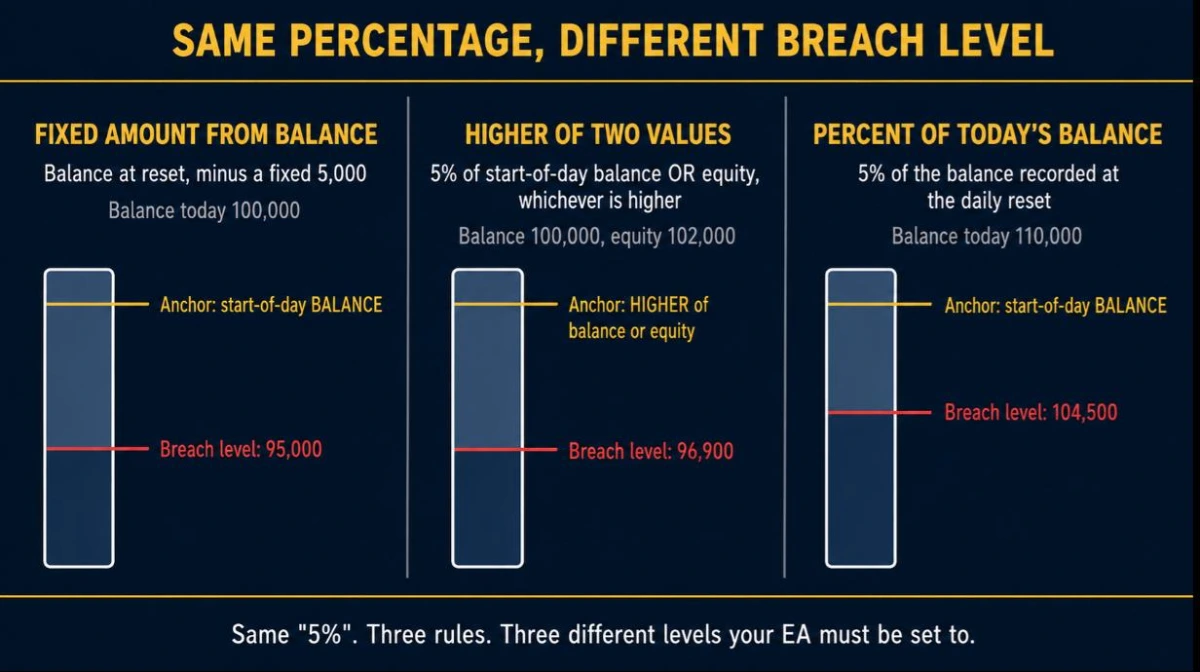
A 5% Daily Limit Is Not Always the Same 5%
Three firms, three published rules, three different configurations. All of these come from the firms’ own documentation rather than from summaries.
FTMO, 2-Step Challenge: the Maximum Daily Loss lesson in FTMO’s Academy states the limit as the account balance at midnight CE(S)T of the previous day, minus 5% of the initial simulated capital.
The reference is balance. The allowance is a fixed amount, not a percentage of today’s balance.
The5ers, High Stakes: the daily loss is 5% of the starting equity or the starting balance of the day, whichever is higher, measured on MT5 server time. Maximum loss is 10% of the initial balance.
FundedNext, Stellar: 5% daily for 2-Step, 3% for 1-Step, 4% for Lite. The calculation includes running and closed losses plus swaps, commissions and fees, and the day resets at 00:00 server time.
Three consequences follow immediately. FTMO needs a balance anchor and a currency amount. The5ers needs a higher-of-two comparison that a single-anchor setting cannot reproduce on its own.
FundedNext defines its reset in the same clock your terminal runs on, which FTMO does not. Never configure a daily loss limit EA from the headline percentage alone.
Why a Start-of-Day Equity Anchor Fails Against a Balance-Anchored Rule
The failure is easiest to see with numbers. Take an FTMO-style 2-Step account with 100,000 of initial capital.
At midnight your balance is 100,000, but you are holding a position 3,000 in floating loss. Your equity is 97,000.
- The firm’s line for the new day is 100,000 minus 5,000, which is 95,000.
- Your equity is already 97,000, so you have 2,000 of room, not 5,000.
- An EA anchored on start-of-day equity takes 5% of 97,000 and triggers at 92,150.
Equity would cross the firm’s breach line at 95,000 and keep falling for another 2,850 before the EA did anything at all. The tool works perfectly. The account is already gone.
Anchoring on start-of-day balance puts the trigger at 95,000, which is the rule. This one choice matters more than any other field in the tool, and it is the one almost no guide explains.
Percent of Balance Quietly Goes Loose Once You Are Ahead
Most traders enter the limit as a percentage, because that is how the firm states it. Against a fixed-amount rule, that shortcut stops being safe the moment your balance rises above the initial capital.
FTMO’s allowance is 5% of the initial simulated capital. That is a fixed currency amount. It is not 5% of whatever your balance happens to be today.
Firm allowance = 5,000 fixed → breach line 105,000
EA at 5% of balance = 5,500 → trigger 104,500
Falling equity reaches 105,000 first. The firm records the breach while the EA is still 500 away from acting. Every profitable day widens that gap.
The fix: enter the daily limit as a fixed currency amount equal to the firm’s stated allowance, less your buffer.
Percentage entry is correct only when the firm’s own rule is a percentage of the day’s opening value, as it is at The5ers and FundedNext. Read the rulebook, then match the unit.
The Reset Itself Can Turn a Safe Position Into a Breach
This one catches traders who did everything else right, and FTMO warns about it directly.
Same account, 100,000 initial capital. Today’s floor is 95,000. During the day, closed profits lift the balance to 102,000, but you are holding a position carrying a 5,200 floating loss.
New floor at reset 102,000 − 5,000 = 97,000
Just after midnight Balance 102,000 Equity 96,800 Floor 97,000 BREACH
Your equity has not moved. The new limit has. You are in breach at 00:00:01, having taken no new risk whatsoever.
A protection EA that simply records the balance whenever it happens to be attached will not see this. The reset has to be a real scheduled event that re-anchors and re-evaluates immediately.
Whose Midnight? Broker Server Time Versus the Rule’s Clock
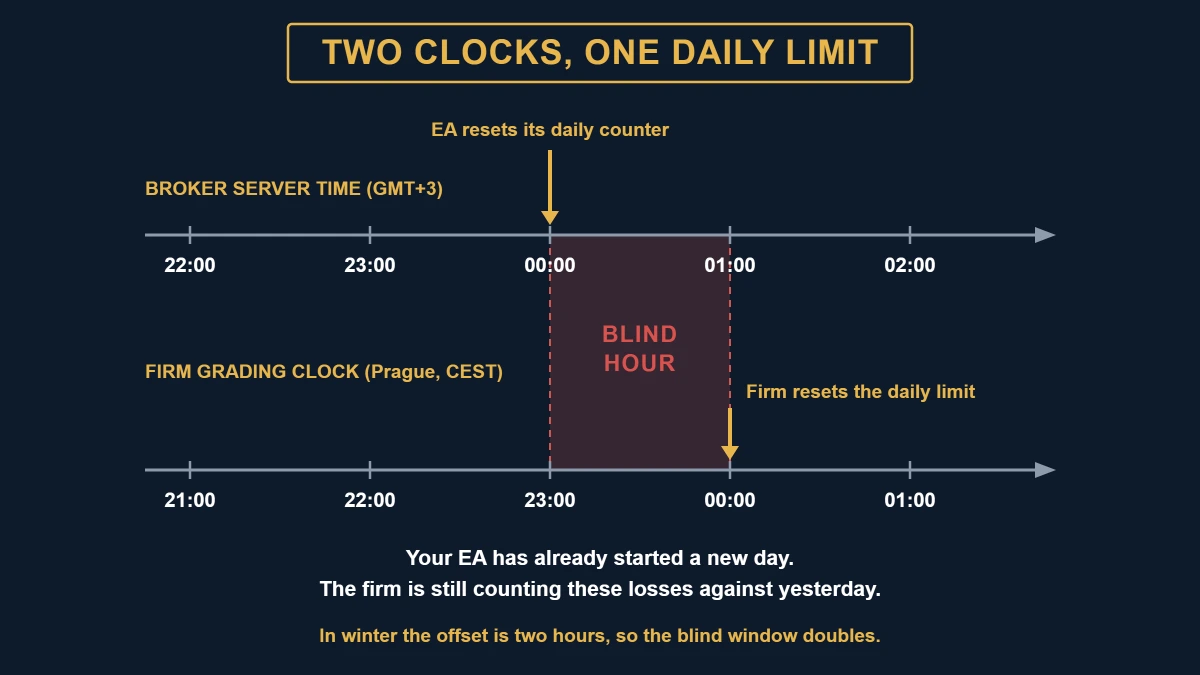
Your EA resets on broker server time, because that is the clock available inside the terminal. Your firm grades you on whatever clock its rulebook names.
Those are frequently not the same clock, and the gap is measured in hours.
FundedNext is the easy case: its rule is written in server time, so a 00:00 server reset in the EA is exactly right.
FTMO is the hard case. Maximum Daily Loss resets at midnight CE(S)T, which is Prague civil time, while FTMO’s MetaTrader servers have run on GMT+3.
In European summer Prague is GMT+2, so the server clock sits one hour ahead of the grading clock. In winter Prague is GMT+1 and the server clock is two hours ahead.
Set the EA’s reset to 00:00 server time on that account and this happens:
- The server clock reaches 00:00. The EA zeroes its daily counter and re-anchors.
- In Prague it is still 23:00 of the previous day. The firm is still counting against yesterday’s limit.
- For the next hour, every loss you take is invisible to your EA and fully countable by the firm.
An hour is a long time in a thin late-session book. In winter the window is two hours.
FTMO has also published transition weeks where the offset temporarily shifted by an extra hour around the daylight saving changeover, so this is not a number you set once and forget.
What to enter instead: the server-time equivalent of the firm’s reset. For an FTMO-style rule on a GMT+3 server that is 01:00 server time in summer and 02:00 in winter.
Confirm it against the firm’s own countdown to the reset rather than against your own arithmetic, and re-check after every changeover. Our GMT offset finder will tell you what your broker’s server clock is actually set to, which is the number this calculation depends on.
Current Drawdown and Worst Drawdown Consumed Are Different Numbers
An account can fall to the permitted boundary at 10:30 and recover fully by noon. At noon the current drawdown looks healthy. The fact that matters is where the account was at 10:30.
A trader recovers from an intraday excursion. A breach does not un-breach because equity came back.
So a protection tool needs to track two things: where the account stands now, and the worst level reached at any point in the current trading day.
If the tool’s daily figure resets on recovery, it is a drawdown display rather than a drawdown limiter, and its dashboard will tell you that you are fine on a day the firm has already failed you.
Your Trigger Price Is Not Your Fill Price
An EA cannot close positions at the equity level where it made the decision. It sends close requests, and the fills land somewhere worse.
This is not a matter of opinion. MetaQuotes states it plainly in the MQL5 OrderSend documentation: for a market order, a successful return means only that the order has been placed in the trading system for further execution.
The server response code has to be checked separately. MT4’s OrderClose() has the same property from a different API.
Between the decision and the last fill, several things widen the gap:
- Spread: every position closes at the far side of the book, and spreads widen exactly when protection tends to fire.
- Slippage: during a release or a liquidity hole, the fill price and the trigger price are simply unrelated.
- Sequential closes: several positions close one after another, at prices that no longer existed when the decision was made.
- Rejections: a rejected close has to be retried, which costs more time at worse prices.
That is the entire reason a buffer exists. Setting your trigger at exactly the firm’s limit means the first tick of slippage puts you past it.
Do not take a buffer number from an article, including this one. Measure your own.
For each protection event, compare the equity recorded at the trigger with the equity once every position was flat. The distribution of that difference across your instruments and sessions is your real buffer requirement.
A trader running one EURUSD position in London and a trader running gold and indices through the New York open should not use the same buffer, and no published figure covers both.
Closing the Positions Is Only Half the Job
If you run other EAs, a tool that only flattens positions buys you seconds.
Your grid EA, news EA or copy trader has no idea a protection event occurred. On the next tick it finds a valid setup and opens a new position.
The account resumes losing, protection fires again, and the rest of your allowance goes into spread and fills rather than into one clean stop.
Removing the other Expert Advisors from the terminal, rather than only closing their trades, is the difference between a stop and a pause. Pending orders need cancelling for the same reason, since they will still trigger on their own.
The same logic applies to you. A tool that locks the account into a state requiring a deliberate manual reset makes resuming a decision instead of a reflex, which is precisely what the rule was there to enforce.
The Guard Has to Keep Watching When Its Chart Goes Quiet
An Expert Advisor attached to a chart receives OnTick for that chart’s symbol only. An account-level guard that does all of its work in OnTick is blind whenever its host symbol stops ticking, even though the rest of the account is fully exposed.
Put the guard on a thin cross during the Asian lull, or on a symbol whose session has closed, while your real exposure is in gold or an index. The guard’s chart goes silent. Your equity does not.
MetaQuotes documents the alternative: the OnTimer event handler fires on a schedule the EA sets with EventSetTimer(), independently of incoming ticks. A timer-driven guard keeps evaluating equity when the chart is quiet.
Test it in five minutes: attach the guard to a chart whose session is currently closed, or to your least liquid available symbol, and watch whether its dashboard values keep updating. If the numbers freeze, the tool is tick-driven.
Configuring KT Equity Protector Against These Rules
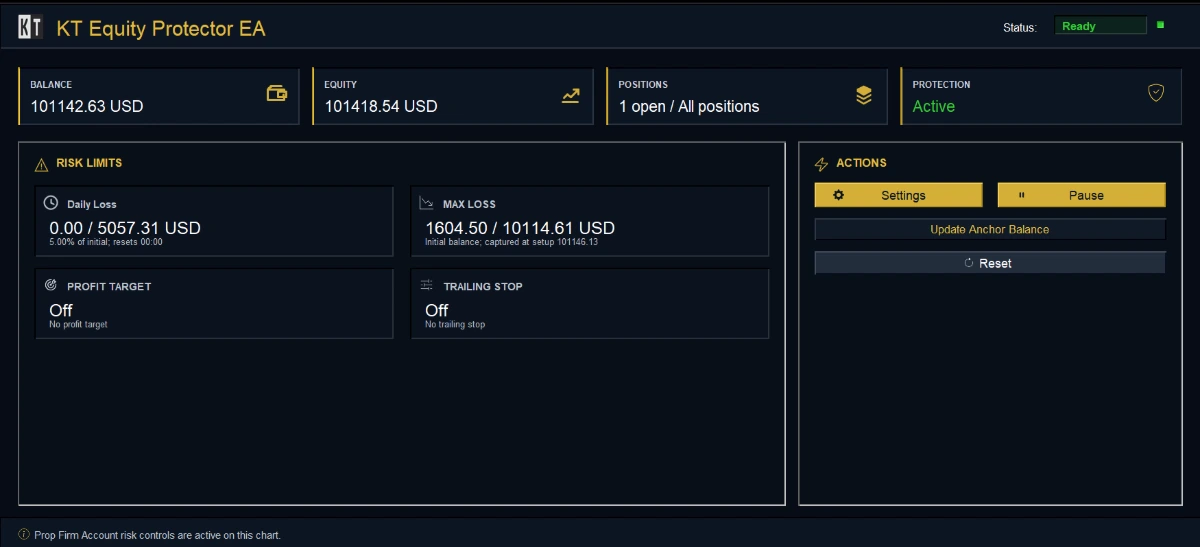
KT Equity Protector EA exposes exactly the configuration surface this article has been describing, which makes it a practical way to turn a rulebook into settings rather than into hope.
The daily loss rule offers the anchor choice directly: start-of-day balance, start-of-day equity, previous close balance or previous close equity.
The limit can be entered as a percent of the anchor or as a fixed currency amount, which is what a fixed-amount prop firm rule requires. The reset time and the safety buffer are separate fields, so you can move the trigger inside the firm’s line without touching the limit itself.
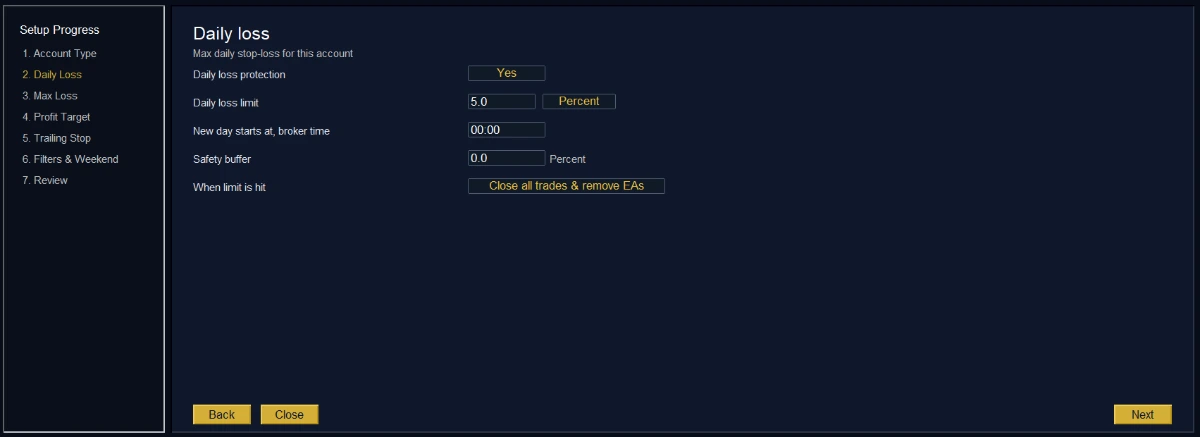
Maximum drawdown is a separate rule with its own four anchors: initial balance, trailing highest balance, trailing highest equity, or a custom starting balance.
That separation matters because the two rules are graded differently. A static rule anchors to the initial balance permanently. A trailing rule moves the floor up with your peak and never moves it back down.
A trailing equity peak is more sensitive still, because an unrealised spike can raise the floor on profit you never closed.
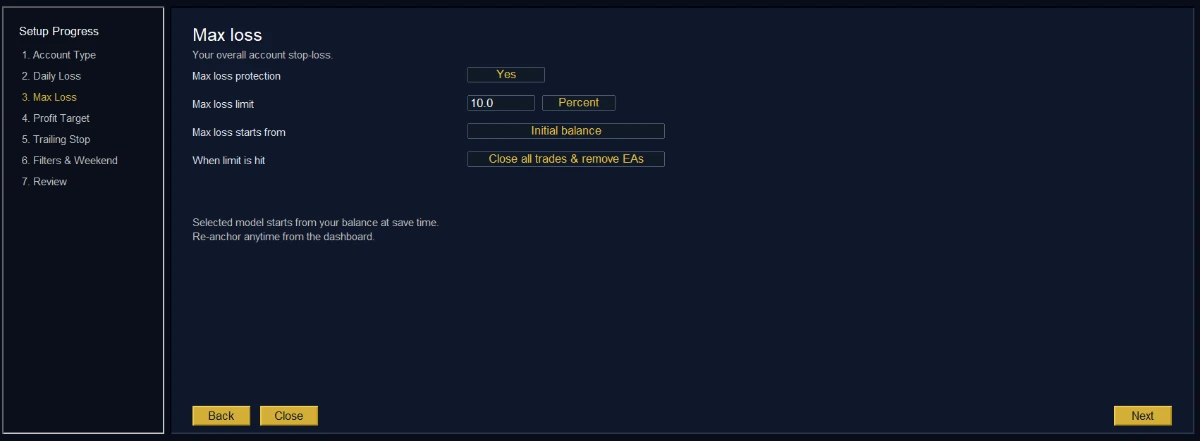
A worked starting configuration for an FTMO-style 2-Step rule:
- Daily loss anchor: start-of-day balance
- Daily loss limit: fixed currency amount equal to 5% of initial capital
- Safety buffer: your own measured overshoot, not a number from a blog
- Reset time: the server-time equivalent of the firm’s midnight, re-checked after each daylight saving change
- Max drawdown anchor: initial balance, limit as a fixed currency amount
- Action: close all and remove every other EA from the terminal
For The5ers-style rules, note the limitation honestly: a higher-of-balance-or-equity reference is not reproduced by picking either anchor on its own. Choosing the balance anchor is the conservative option, since it triggers earlier on any day that opens with floating profit.
The EA places no trades, so it runs alongside manual trading and other Expert Advisors without touching their entry or exit logic. Symbol, magic number and comment filters let you scope which positions it acts on while still measuring risk across the whole account.
It also writes a daily CSV log to the MetaTrader files folder recording each trigger, each close attempt and each broker response. That log is what makes the buffer measurement described earlier possible, and it is the artefact worth keeping if a firm ever queries a close.
What No Daily Drawdown Limit EA Can Prevent
Being specific about failure cases is more useful than a disclaimer.
Gaps: a protection EA acts on prices that exist. If the market reopens well below your trigger, there was no price at which to close. That is why a scheduled Friday flatten is a risk control rather than a convenience.
Instant repricing: an unexpected release can move equity through your trigger between two ticks. The EA will still act, at the first price it can reach.
Platform downtime: if MetaTrader is closed, the machine is asleep or the VPS has dropped its connection, nothing is watching.
A trading EA that misses an entry costs an opportunity. A guard that misses an exit costs the account, which is the honest argument for a VPS.
Disagreement with the firm’s numbers: your terminal’s equity and the firm’s dashboard are separate calculations with separate latencies. Treat the buffer as covering that difference too.
If a bad day has already happened, the arithmetic of getting back is worth understanding before you size the next one. Our drawdown recovery calculator shows what a given loss actually costs in required return.
Why the Strategy Tester Will Not Validate This
A protection EA opens no positions, so a backtest produces no trades, no equity curve and nothing to evaluate. Optimisation is meaningless for the same reason.
Any performance figure attached to a tool like this is measuring something else entirely. Test it on a demo account against live prices instead:
- Set the daily limit small enough to trigger easily, for example a fraction of a percent.
- Open several positions across different symbols, including one that moves fast.
- Let it fire, then read the log.
- Compare equity at the trigger event with equity once every position was closed. That difference is your buffer floor.
- Repeat it during a scheduled release, when spreads widen. That is the only condition the number needs to survive.
- Confirm the daily counter resets at the exact moment you expect, in the clock your firm uses rather than the one your platform displays.
The last step is the one people skip, and it is the one that quietly costs accounts.
The Part Worth Keeping
A daily drawdown limit EA is not insurance against a bad strategy. It is a mechanical answer to a specific problem: the loss that happens after you stopped making good decisions.
It works only when the arithmetic inside it matches the arithmetic your firm is running. Match the anchor to what the rule measures. Match the unit to how the rule is stated.
Match the reset to the firm’s clock rather than your broker’s. Then size the buffer from your own fills.
KT Equity Protector EA exposes all four of those as explicit settings instead of burying them in defaults, on MT4 and MT5, from a single chart. It also gives you the CSV log you need to measure the buffer, and a protection action that stops other EAs from undoing the stop.
Set up your account protection rules
About this article
Published by Keenbase Trading, which has built MetaTrader 4 and MetaTrader 5 indicators, Expert Advisors and free trading tools since 2018. The platform behaviour described here comes from building and supporting those tools.
The prop firm figures quoted above were checked against each firm’s own published rules on 9 August 2026. Those rules change, so confirm against your firm’s current rulebook before configuring anything.