
Keenbase Trading » Blog »
MT5 Risk Management EA for Prop Traders: What Should It Actually Protect?
It should protect the account-level lines that end your account, measured the way your firm measures them, and it should still be working when you are not at the desk. Everything else a risk EA offers is trade management wearing a risk management label.
That distinction decides which product you actually need. Lot size calculators, break-even movers and per-position trailing stops make individual trades better behaved. None of them knows what total account equity is doing, and none of them knows where your firm’s floor sits today.
Funded accounts are rarely lost one trade at a time. They are lost when account equity touches a level that was computed overnight, on a server you cannot see.
So the question worth asking about any MT5 risk management EA is narrow: does it watch the number my firm watches, against the line my firm computes, and can it act before that line is reached?
Both systems agree on equity, then disagree on the line
Prop firm breach rules are written against equity, and equity includes what your open positions are doing right now. FTMO defines it in its trading objectives as balance plus open position profit and loss, plus or minus swaps, minus commissions. Drop below the limit and the rule is violated, whether or not a trade has closed.
That part is easy for an EA. MetaTrader exposes the same figure through ACCOUNT_EQUITY, which already carries floating profit and loss, swaps and commission. A correctly written EA and the firm’s risk engine are reading the same number.
The agreement ends there. What the two can disagree about is the level that number must not cross, and that disagreement is where funded accounts are lost.
The anchor matters more than the percentage
Search almost anywhere and the daily loss rule is described as a fixed percentage of your starting balance. For FTMO’s 2-Step evaluation that is half right, in a way that costs accounts.
The amount is 5% of the initial capital. The limit is not fixed. It is recalculated at 00:00 CE(S)T from the account balance recorded at that moment.
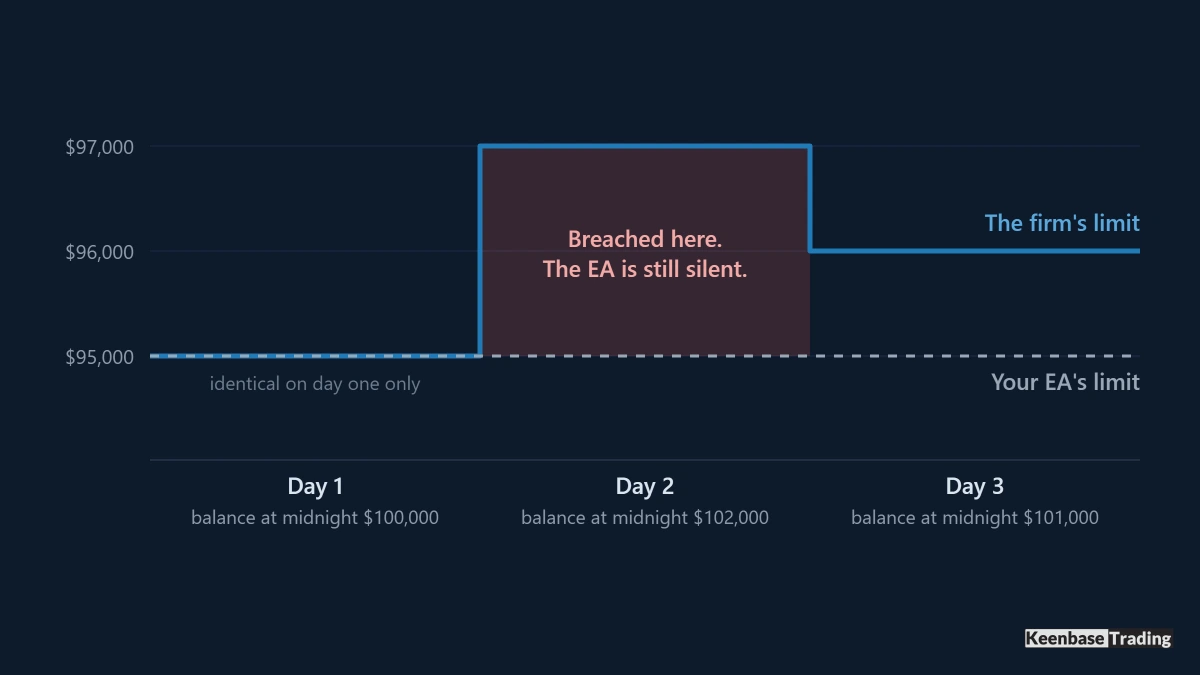
Take a $100,000 account that finishes its first day at $102,000. The firm’s limit for day two is $97,000. An EA configured to protect 5% of the initial balance holds a static floor at $95,000.
You are now unprotected across a $2,000 band. Equity passes $97,000, the account is breached on the firm’s side, and the EA stays quiet because its own line is still $2,000 below. The dashboard reads protected right up to the moment the account is gone.
Run the same arithmetic after a losing day and the error reverses. Finish at $98,000, the firm’s limit becomes $93,000, and the static EA still fires at $95,000. Nothing is breached, but your positions are closed with $2,000 of legitimate room left.
A static anchor is correct on day one and wrong every day after it. An EA that supports “5% daily loss” while computing that percentage from the wrong starting value is not enforcing a 5% rule. It is enforcing a different rule that happens to share a number.
Anchors and clocks differ between firms, and between products from one firm
FTMO’s 2-Step maximum loss is static: initial capital minus 10%, and it never moves. The 1-Step version of the same rule is an end-of-day trailing limit, recalculated from the highest balance recorded at any previous midnight, rising but never falling. One firm, two products, two anchor models running at the same time.
FundingPips takes a third approach on its 2 Step Pro model. At the start of each day it records both balance and equity, and the higher of the two becomes the baseline for a 3% daily limit. Its maximum loss is a static 6% floor.
The clocks differ too, and that is the detail most configurations miss. FTMO recalculates at 00:00 CE(S)T. FundingPips resets at 00:00 platform time, which it states as UTC+3. Those are not the same moment, and neither one is necessarily your broker’s server midnight.
Set out side by side, the percentage is the least interesting column.
| Rule | What sets the line | When it is set |
|---|---|---|
| FTMO 2-Step daily loss | Balance at the reset, less 5% of initial capital | 00:00 CE(S)T, daily |
| FTMO 2-Step maximum loss | Initial capital, less 10% | Once. It is static |
| FundingPips 2 Step Pro daily loss | Higher of opening balance or equity, less 3% | 00:00 platform time, UTC+3 |
| FundingPips 2 Step Pro maximum loss | Starting account size, less 6% | Once. It is static |
Prop firm rules change often, so check the current limits and the reset timezone with your own firm before you configure anything.
What that means on the configuration screen
This is why a serious risk EA offers a choice of anchors rather than one drawdown percentage field. What has to be configurable is not only how much, but from what, and at which moment that reference is captured.
The KT Equity Protector EA exposes both. Its daily loss rule anchors to start-of-day balance, start-of-day equity, previous close balance or previous close equity, with the reset set in broker time and locked to 00:00 under the prop firm profile.
Its maximum loss rule anchors to initial balance, trailing peak balance, trailing peak equity or a custom starting balance.
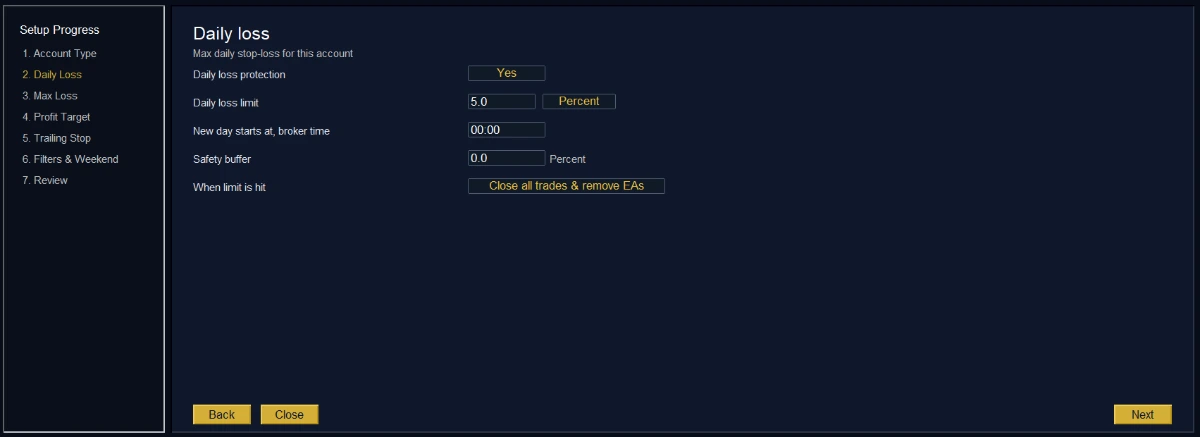
Match those against your own rulebook rather than assuming any prop firm profile covers it.
A rule whose baseline is the higher of opening balance and opening equity, as FundingPips uses, is not the same as either a balance anchor or an equity anchor on its own, so that particular calculation cannot be reproduced exactly by picking one of them.
Where a mismatch like that exists, the workaround is to stop expressing the limit as a percentage and set it as a fixed currency amount each day, derived from the baseline the firm’s own dashboard shows. That follows from the arithmetic rather than from a test, and it costs you a daily manual step, but it removes the mismatch entirely.
Three ways a terminal-side EA stops protecting you
An EA runs inside your MetaTrader terminal, not on the firm’s server. That single fact produces three failure modes, all documented, none of them visible on a panel that says protection is active.
It can be watching the wrong symbol: the MQL5 OnTick reference states that the event is generated only when a new tick arrives for the symbol of the chart the EA is attached to. Put the EA on a quiet chart while your positions sit in gold and indices, and the risk check runs only when that quiet symbol happens to print.
The fix is a timer, because EventSetTimer gives each EA its own event stream that does not depend on the chart’s quotes at all. Ask any EA you are evaluating whether it monitors on a timer or on ticks.
It can see the breach and be forbidden from acting: disabling auto trading does not stop an EA. The same reference page is explicit that the tick event still fires and that the ban applies only to sending trade requests.
Your risk EA will calculate the breach correctly, attempt to close, and be refused. A green panel and a disabled AutoTrading button can coexist.
Third, it cannot act while the terminal is closed. No terminal, no ticks, no timer, no protection. Positions held overnight on a sleeping laptop are unmanaged, which is the honest reason a VPS is recommended for anything guarding a funded account rather than merely convenient.
None of these are reasons to skip the EA. They are the questions that separate a tool you can rely on from one that produces a reassuring display.
Closing is a request, not an event
An EA does not remove risk at the moment it fires. It sends close requests, and the MQL5 PositionClose reference says so plainly: successful completion of the call does not always mean the trade operation was executed, and the trade server return code still has to be checked.
Between the trigger and the fill sit spread, latency, slippage and the possibility of a rejection. In the conditions that trigger a risk rule, all four are worse than usual. FundingPips states that the moment your account value touches the limit, even briefly, the violation stands, and a recovery afterwards does not undo it.
So the trigger has to sit above the line. Set it at the breach level and you are betting that the distance costs nothing. Set it above and the gap becomes a budget you accepted deliberately, which is what a safety buffer is for and why the KT Equity Protector EA can be set to trip at, for example, 4.8% against a 5% rule.
The right size is not universal. It should reflect the spread and slippage you actually see on the symbols you trade, at the times you trade them, which your own trade history can tell you and no article can.
The same logic explains why close all and remove every other EA exists as an action rather than simply closing positions. Flattening while a strategy EA is still armed invites it to reopen thirty seconds later, below a line you were just protected from.
Measure the whole account, then check what the action closes
The KT Equity Protector EA can filter by symbol, magic number or comment, so risk is measured across the whole account while the action is limited to chosen trades. That is genuinely useful when you want one strategy managed and the rest left alone.
On a prop account it needs care. The firm grades total account equity. If the rule fires and your filter closes only one strategy, the remaining positions are still open and still counting against the same floor. Filtered action is right only when leaving those positions open is a decision rather than an oversight.
Test it before you trust it
Configuration errors in this category are silent. The EA reports that it is protecting the account, and it is, just not the line the firm is grading. So test it rather than trusting the panel, on a demo account of the same type, before it goes near a funded one.
- Set an absurdly tight limit, such as a daily loss of 0.2%, so you can trigger it deliberately within a few minutes.
- Attach the EA to one chart, then open a small position on a different symbol. If the rule never fires while that other symbol moves against you, the EA is tick-driven on the chart symbol and is blind between prints.
- Trigger the limit and time the sequence. Note equity at the trigger and equity once everything is flat. That difference is your real slippage budget, and your buffer needs to be larger than it.
- Turn AutoTrading off, then breach the limit again. A well built EA should tell you loudly that it cannot act. Silence here is the dangerous answer.
- Leave a position open across the daily reset and check what the EA anchors to. Compare that number, and the timestamp, against the baseline your firm’s own dashboard recorded at its midnight.
- Read the log. The KT Equity Protector EA writes a daily CSV recording timestamp, event type, severity, rule, balance, equity, floating profit and loss and position count for every warning, trigger, close attempt and retry, which is the only way to reconstruct what happened afterwards.
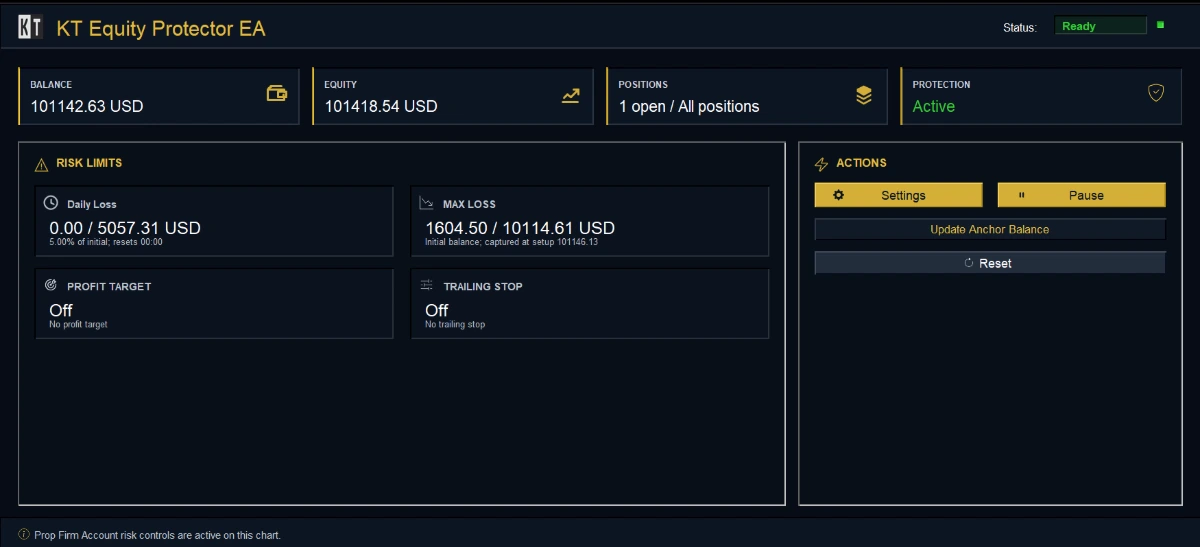
Step five is the one most traders skip, and it is the one that catches the anchor and timezone mismatch that no amount of correct trading will survive.
If you want an account-level risk manager that exposes the anchor rather than assuming one, KT Equity Protector EA runs from a single MT4 or MT5 chart, watches the whole account alongside your manual trades and other EAs, and acts on the rule you configured rather than on individual trades.
See how KT Equity Protector EA is configured
About this article
Published by Keenbase Trading, which has been trading since 2018 and builds MT4 and MT5 indicators, Expert Advisors, free tools and custom development.
Prop firm rules change often, and the reset timezone changes between firms, so check the current limits with your own firm before relying on them.