
GMT Offset Calculator For Expert Advisors [EA]
Getting the GMT offset right is one of the most important steps when setting up an Expert Advisor. If the value is wrong, your EA may trade at the wrong times or miss signals altogether.
Our GMT Offset Calculator takes out the guesswork. Simply select the hour you see in your broker’s Market Watch and click Calculate. The tool checks against live UTC time and instantly gives you the correct integer offset to use in your EA settings. Because it relies on UTC, the result is accurate whether your broker is on standard time or daylight saving time.
GMT Offset Finder
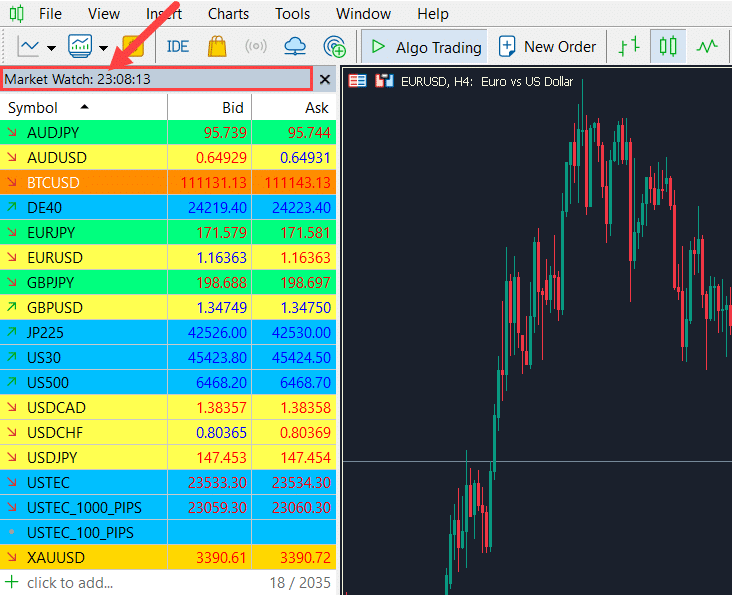
--:--:-- UTCEnter the hour you see in your broker's Market Watch right now (0–23). Then click Calculate. The tool outputs the GMT offset.
How it works
The tool compares your broker's Market Watch hour with the live UTC hour and computes the integer offset. It normalizes to the common trading range of −12 to +14.
Daylight Saving Time is handled implicitly because we use the current UTC hour. If your broker shifts seasonally, the offset you get here reflects the current season.
If you configure an EA on weekends or far from market hours, recheck the value when markets open in case your broker adjusts server time.
Where to find “Market Watch hour” in MT5
Why It’s Essential to Set the Correct GMT Offset in Your EA
Most Expert Advisors rely on broker time to decide when to open and close trades. If the GMT offset in your EA settings doesn’t match your broker’s server time, the strategy can fall out of sync. That means signals may trigger too early, too late, or not at all.

By entering the correct GMT offset, you align your EA’s internal clock with the market. This ensures your strategies run exactly as designed, whether they’re based on session times, daily candles, or specific trading hours. Even a one-hour mismatch can change results completely.
Example
Imagine you’re running an EA that opens a long trade at the start of the European market hours and closes it at the end.
The European session runs from 7:00 a.m. to 4:00 p.m. GMT. For your EA to follow that schedule correctly, it needs to know the broker’s server time in relation to GMT.
Here’s where the problem comes in: the MetaTrader platform can only read the server time (which changes from broker to broker) or your computer’s local time (which changes from trader to trader). Neither of these automatically tells the EA what the GMT offset is.
That’s why you must manually set the GMT offset so your EA’s timing lines up with the actual market session.
Why Use our GMT Offset Finder?
- Automatic GMT Offset Detection: Instantly shows whether your broker’s server time is GMT+2, GMT+3, or any other offset. No need for manual math or chasing broker support.
- DST Compatibility: Automatically accounts for daylight saving time shifts, so your EA keeps running smoothly and avoids the seasonal errors that often appear when GMT offsets change in winter or summer.
- Backtesting Accuracy: Aligns your historical data with real market conditions by applying the correct GMT offset for the specific period you’re testing. This way, your backtest results truly reflect how the EA would have performed.
Final Thoughts
Expert Advisors often fail simply because they don’t know the correct GMT offset from the broker’s server. When traders try to calculate it manually, the result is missed trades, wrong session timings, and unreliable backtests.
Our GMT Offset Calculator removes that risk. It automatically reads live UTC time, matches it with your broker’s Market Watch, and gives you the exact offset your EA needs. No guesswork, no seasonal surprises, just precise settings that keep your strategies running the way they were designed.