
How to Read Volume Profile: POC, Value Area and What Price Did Next
A volume profile is a histogram turned on its side. Each horizontal bar shows how much trading happened at one price during the period the profile covers. Long bars mark the prices with the most trading, and short bars mark the prices with little.
Read it in four steps, in this order:
- Point of Control (POC): the longest bar, the single price with the most volume.
- Value area: the band around the POC that holds 70% of the volume. Its top is the Value Area High (VAH) and its bottom is the Value Area Low (VAL).
- Volume nodes: the thick parts of the histogram (high volume nodes) and the thin parts between them (low volume nodes).
- The next open: where the following day opens against that value area: above it, inside it or below it.
The first three steps describe a day that has finished. The fourth turns that day into a plan for the next one, and it is where the numbers most traders are taught stop matching what price actually did. We measured them on about two years of gold and five other markets, and the results sit beside each step below.
Step 1: Find the Point of Control (POC)
The Point of Control (POC) is the price row that collected the most volume. It is the price the market kept trading at, not the closing price and not a guaranteed support or resistance level.
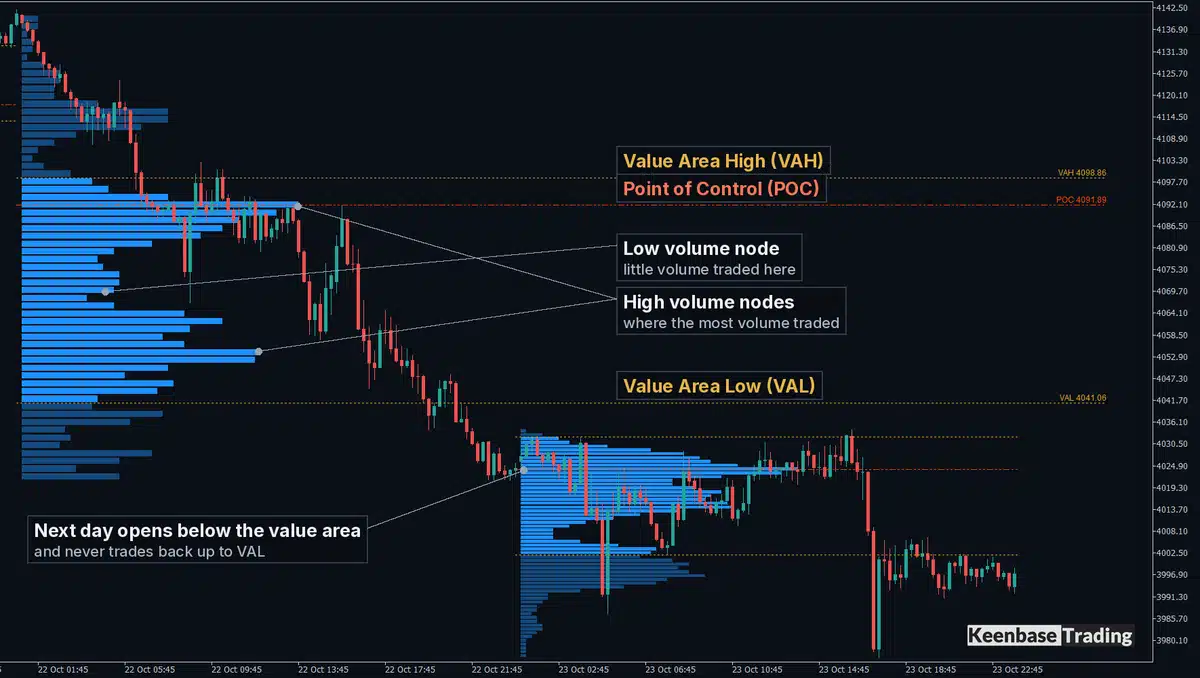
On the gold day in the chart, the POC sat at 4091.89, near the top of a day that fell almost 120 dollars from its high to its low. Most of that day’s trading happened around the POC, before the fall.
When there are two peaks: read the zone, not the line. The POC is only the tallest row, and on some days a second row is almost as tall. We built 59 recent gold days twice, once from 1-minute candles and once from 15-minute candles.
The POC moved by a median of 1.7% of the day’s range. On 11 of those days, about one in five, it jumped more than 10% of the range, and on one day by 42%. Every one of those 11 days had a second peak at least three quarters as tall as the POC.
On a day like that, the POC line can sit at either peak, and a small change in how the profile is built moves it from one to the other. The useful information is that volume was concentrated at both prices, with a thinner area between them.
Step 2: Read the Value Area: VAH and VAL
The value area is the band of prices that holds 70% of the day’s volume. The usual way to build it starts at the POC row and adds one row at a time, always the busier of the two neighbouring rows, above or below, until the band holds 70%.
The top of that band is the Value Area High (VAH) and the bottom is the Value Area Low (VAL). On the example day, VAH was 4098.86 and VAL was 4041.06, so 70% of the day’s activity fitted into about 58 dollars of a 120 dollar range.
The 70% describes how the volume was spread. It is not the chance that price stays inside the band tomorrow, and it is not a 70% chance that a trade taken inside the band works.
The usual reading is that prices inside the value area were accepted by the market and prices outside it were visited and left quickly. That is an interpretation, and Step 4 shows how far it holds when the next day opens.
Other programs do not always build the value area the same way. Some add two rows at a time, and the number of rows differs. The same day can show a slightly different VAH and VAL in two platforms, which matters when you compare levels from a video with the levels on your own chart.
Step 3: Spot the High and Low Volume Nodes
A high volume node is a thick part of the histogram, where a lot of volume traded. A low volume node is a thin part between thicker ones, where little volume traded.
The example day has two high volume nodes: one around the POC near 4092 and one lower, around 4055. Between them, from about 4065 to 4080, the histogram thins out. Price crossed that thin area quickly on its way down.
The outline of the histogram is a quick summary of the day:
- P shape: most of the volume sits high in the day’s range, with a thin tail below.
- b shape: the mirror image, with most of the volume low in the range.
- D shape: the POC near the middle and narrower ends, a day that went sideways.
These shapes describe trading that has already happened. A P shape does not by itself predict a fall, and a b shape does not by itself predict a rise. The measurements in the next steps do not test the shapes.
Step 4: Read the Next Open Against Yesterday’s Value Area
This is the step that turns a finished profile into a plan. When the new day opens, note whether it opened inside yesterday’s value area, above it or below it. Then look at how often price reached yesterday’s levels on days that opened the same way.
On gold, measured over 501 trading days of one broker’s MT5 history:
| Where the day opened | Days | What happened the same day |
|---|---|---|
| Inside yesterday’s value area | 286 | Reached yesterday’s POC on 83% of days, yet still closed outside the value area on 69% |
| Above or below it | 215 | Came back into the value area on 78% of days, reached yesterday’s POC on 46% |
Two things stand out. A day that opens inside yesterday’s value area usually reaches the POC, but on all six markets measured, 64% to 69% of those days still closed outside that value area. And a day that opens outside yesterday’s value area usually comes back into it, but fewer than half of those days reach the POC.
Distance before the name of the level: the better question is how far the level is from the open, measured against the normal size of a day. The distance is measured in ATR, which here means the average daily range (high minus low) of the previous 14 days, not the Average True Range indicator.
| Distance from the open to yesterday’s POC, VAH or VAL | Reached the same day on gold |
|---|---|
| Under 0.25 ATR | 84% of 825 cases |
| 0.25 to 0.5 ATR | 53% of 347 cases |
| 0.5 to 1 ATR | 26% of 251 cases |
| 1 to 2 ATR | 17% of 78 cases |
A level within a quarter of a normal day’s range was reached most of the time. A level a full day’s range away was reached on about one day in six. All six markets showed the same pattern, with the nearest group between 83% and 89%.
A worked example from the chart: the next gold day opened at 4025.96, which is 15.10 dollars below VAL. The average daily range was 67.81 dollars, and 15.10 divided by 67.81 is about 0.22, so VAL sat in the under 0.25 ATR group: 84%.
The POC was 65.93 dollars away, about 0.97 ATR, in the 26% group. VAH was about 1.08 ATR away, in the 17% group.
That day’s high was 4034.28, about 7 dollars short of VAL, so none of the three levels was reached. A level in the 84% group is missed on about one day in six, and this was one of those days. The numbers are base rates for planning, not promises.
The 80% Rule, Measured: Closer to a Coin Flip
The rule as it is usually taught starts with an open outside yesterday’s value area. If price then holds back inside the value area for two 30-minute periods, the rule says there is an 80% chance that price crosses the whole value area to the other side.
We measured it on six markets, with two 15-minute closes in a row inside the value area as the sign that price was accepted back inside. The far side was reached on 42% to 53% of those days:
| Market | Days measured | Days accepted back inside | Reached the far side |
|---|---|---|---|
| XAUUSD | 501 | 151 | 43% |
| EURUSD | 489 | 180 | 42% |
| GBPUSD | 489 | 176 | 43% |
| USDJPY | 489 | 120 | 42% |
| US500 | 501 | 177 | 53% |
| US30 | 500 | 160 | 45% |
Requiring two 30-minute closes, as the rule is usually stated, changed little: on gold it gave 141 days and 45%. The buy case was weaker still. On gold, 73 days opened below VAL and then had two 15-minute closes in a row inside the value area. Only 37% of them reached VAH.
Once price was accepted back inside, yesterday’s POC was the more common destination: it was reached that day on 62% to 67% of those days across the six markets. Acceptance makes the far side possible; it does not make it likely.
These numbers come from one broker’s demo price history, with days counted by the broker’s server clock, over about two years. They count whether a level was reached the same day, not whether a trade would have made money after spread, stop placement and timing.
A different session definition could give a different rate, which is why a published probability is only useful together with its exact rule.
What Volume Means on an MT5 Forex or Gold Chart
MetaTrader 5 has no volume profile among its built-in indicators. Its four built-in volume indicators are Accumulation/Distribution, Money Flow Index, On Balance Volume and Volumes, so seeing a profile on an MT5 chart at all needs a custom indicator.
The volume is also different from the volume in most volume profile videos, which are made on futures and stock charts. For forex, MetaQuotes defines volume as ticks: the number of price changes in each period, not the number of contracts traded.
On the broker server used for the measurements, the real volume field was zero for all six symbols, including the two US index CFDs. A forex or gold profile in MT5 is therefore a profile of price activity in your broker’s feed.
Tick activity tends to rise and fall with real trading, which is why the shape is still useful. That is a reasoned assumption, not something the measurements above test. Two brokers’ feeds also differ, so their profiles of the same day can differ a little.
A few practical limits come with this:
- History depth: a profile can only reach as far back as the broker’s history for that symbol. A profile that stops at a certain date usually means the history ends there, not that the indicator has failed.
- Desktop only: the MT5 mobile app cannot run custom indicators, so a volume profile is a desktop tool on MT5.
- Candles, not single trades: the profiles here spread each candle’s tick volume evenly over the price rows the candle covered, using 1-minute candles where the broker’s history allows. That is why the two-peak days in Step 1 move when the candle size changes.
Reading It on Your Own Chart With KT Volume Profile
Doing Step 4 by hand every morning means measuring each distance against the average daily range and keeping your own record of past days. Keenbase makes an indicator that does both on the chart.
The four steps above are what KT Volume Profile Indicator draws on an MT5 or MT4 chart. Each day on M1 to H1 charts gets its own histogram with its POC, VAH and VAL, and yesterday’s levels are drawn across today with a label.
That label carries the reach odds from Step 4, measured on your own chart’s history: how often a level at today’s distance from the open was reached the same day. It changes to “reached” once price gets there. The gold numbers above match what the indicator’s panel showed on that chart.
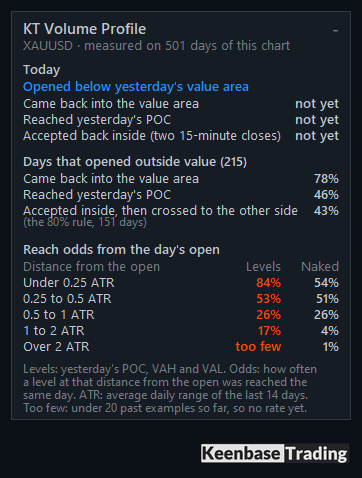
The scenario panel does the rest of Step 4. It shows where today opened against yesterday’s value area, whether price has come back into value, reached the POC or been accepted back inside, and how often each of those happened on similar days. Where fewer than 20 past days exist, it shows “too few” instead of a rate.
Naked POCs, earlier days’ POCs that price has not revisited, stay on the chart with their own odds. On gold, a naked POC within 0.25 ATR of the open was reached on 54% of days, and one more than 1 ATR away on 4% or fewer. An untouched POC is not a magnet by itself; its distance from the open matters more.
A drag box gives you a fixed range profile over any part of the chart and keeps its place when you change timeframe. Alerts tell you when price reaches yesterday’s POC, VAH or VAL, a naked POC or the drag box POC.
Because the odds come from your broker’s history, a different broker or symbol shows its own numbers. The base rates you plan with should come from the chart you trade.
KT Volume Profile Indicator draws each day’s POC, VAH and VAL on MT4 and MT5 and keeps naked POCs on the chart. It also shows how often each level was reached on your own chart history, so Step 4 is ready before the day starts.
See KT Volume Profile Indicator for MT4 and MT5
About this article
Published by Keenbase Trading, which has been trading since 2018 and builds MT4 and MT5 indicators, Expert Advisors, free trading tools and custom MetaTrader development.
Price history and tick volume differ between brokers, so check the odds on your own chart before you rely on them.